In the dynamic world of financial markets, a clear and consistent record is the undisputed cornerstone of success. However, are you still grappling with these chronic trading issues?
- Manual Entry Hassle: Is recording in Excel time-consuming, prone to errors, and difficult to cross-reference trading details?
- Review Blind Spots: Do you get lost in a sea of data, unable to pinpoint the “why I won, why I lost” key moments of decision?
- Stagnant Improvement: When facing drawdowns, are you unsure which habits to adjust or which strategies to optimize for future gains?
The truth is, a professional-grade Trading Journal tool can resolve all these frustrations. TradeBB is precisely the expert platform designed to tackle these pain points. Today, we'll guide you through 3 essential steps to quickly master TradeBB, transforming your trade log from a "cumbersome burden" into an "Accelerator for Trading Proficiency."
Step 1: Zero-Loss Data Synchronization, Ditching Tedious Manual Work
TradeBB's core strength lies in automation. It is designed to free up your bandwidth, allowing you to focus entirely on market analysis and decision-making.
3-Minute Account Integration for Data Accuracy
First, you can easily register with just your email and password on the TradeBB official website. The critical first step after registration is data integration:
- One-Click Sync for Major Platforms: If you use mainstream brokers like MetaTrader 4/5 (MT4/MT5) or TradeLocker, navigate to the “Settings” → “Broker Integration” module. After securely entering your API key or credentials, all your trade data—including instrument, precise entry/exit prices, volume (lots), leverage, and holding duration—is automatically and safely synchronized to your TradeBB journal.
- Why Automation is Crucial: As industry experts emphasize, the true value of a journal is its ability to turn profits from occasional luck into inevitable results . Manual errors compromise the entire review process. TradeBB’s automated sync ensures both data integrity and precision.
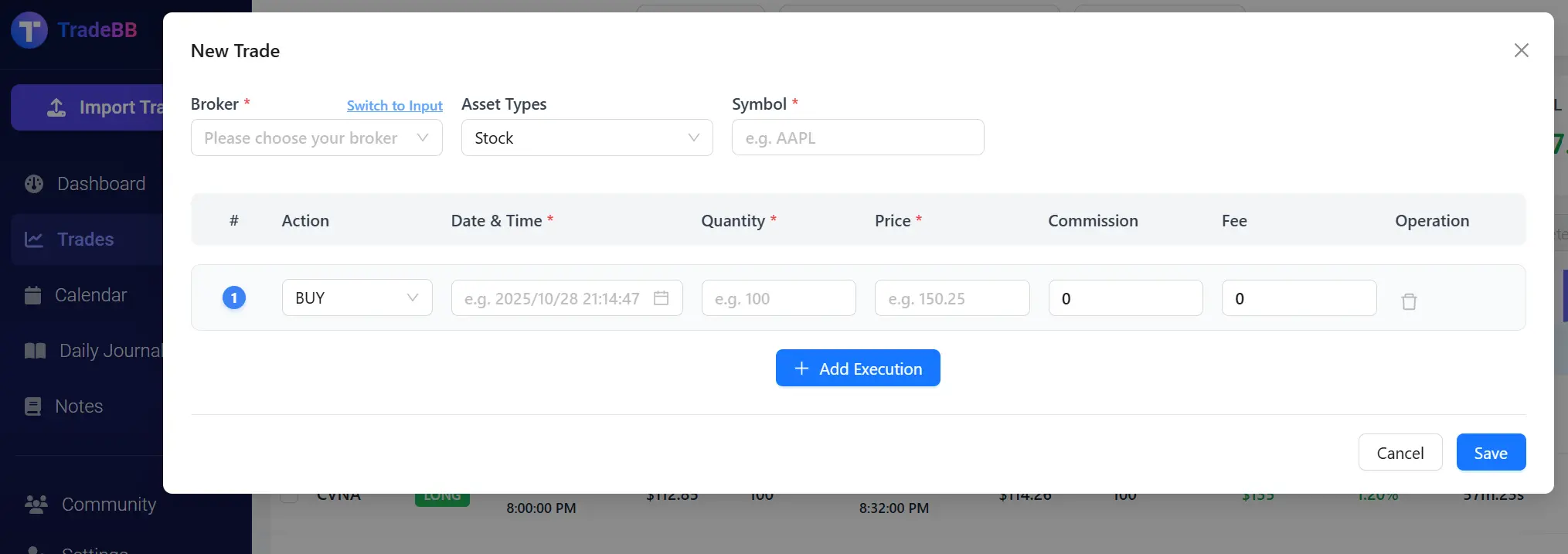
- Solution for Non-Mainstream Platforms: For platforms lacking API access, the “+ New Trade” module allows manual entry. Crucially, the system will still intelligently auto-calculate Net P&L, Return Rate, and other key metrics, eliminating the risk of human calculation errors.
Just as Joydo electronic focuses on providing efficient electronic solutions to ensure stable performance, TradeBB ensures the "simplification of complex processes and precise data recording" in the trading tool sphere, dedicating your time to true value-added activities.
Step 2: Standardized Logging and Deep Tagging – Reshaping Your Trading Logic
Simply recording P&L is insufficient. A professional Trading Journal must capture the logic underpinning the decision. TradeBB's standardized workflow makes this possible, striving to upgrade your log into a structured journal.
1-Minute Trade Snapshot and Context Capture
You no longer have to struggle with "what to record." By clicking “Trades” → “+ New Trade”, you focus only on 3 core data points, with the system handling the rest:
- Basic Info & Instrument: Select the asset (e.g., EURUSD) and the trade direction (Long/Short).
- Precise Time & Price: Enter the exact time (down to the second) and price for entry and exit.
- Trade Quantity: Input the lot size or position size.
Upon submission, TradeBB instantly generates a complete, standardized trade snapshot, ready for deep comparison and analysis.
Deep Tagging: Attribution for Decision Analysis
This is TradeBB’s most powerful feature for skill enhancement. In the “Add/View” module for each trade, you apply multi-dimensional tags:
- Strategy Tags: Mark the specific strategy used (e.g., “Support Reversal,” “Trend Following,” “Consolidation Breakout”).
- Behavior Tags: Record your psychology and execution quality (e.g., “Disciplined Execution,” “FOMO Trade,” “Held Too Long,” “Revenge Trading”).
- Brief Notes: Add a concise note summarizing the precise rationale (e.g., "Entered after candlestick confirmed breakout above daily resistance, targeting previous high").
The Core Value: TradeBB’s structured design is specifically aimed at reshaping your trading logic through this deep attribution. By analyzing every trade's context, you clearly identify your "Trading Edge" and your "Behavioral Flaws," elevating trading from a series of isolated actions to a quantifiable, improvable skill. Guidance on leveraging these core features to build a structured journal and reshape one's trading logic is a key resource for professional development.
Step 3: Visual Performance Dashboard – Unlocking Your Hidden Profit Patterns
Logging trades is just data collection. TradeBB’s ultimate value lies in its powerful visual analytics tools, which convert this data into actionable trading insights.
Deep Insights from the Performance Dashboard
On the TradeBB homepage “Performance Dashboard,” your data is instantly transformed into intuitive charts, giving you a crystal-clear view of your performance:
- Time-Based P&L Heatmap: This reveals which hours of the day are most profitable or have the lowest win rate. You might discover that “10:00-11:00 AM is my most successful window,” helping you optimize your market time.
- Asset Performance Breakdown: Quickly tells you “Gold (XAUUSD) is my primary profit driver,” while a particular minor currency pair is a consistent drain. This guides you to allocate capital to your most successful instruments.
- Tag Statistics and Comparison: The most insightful function is the cross-comparison of Strategy and Behavior Tags. The system can statistically prove: "Your average return is 50% higher when you use the 'Trend Following' strategy," or "Trades marked with 'Impulsive Entry' result in a loss 70% of the time."
Using this quantitative analysis, you move away from emotional trading and begin making strategic adjustments based on objective data to optimize your habits and achieve closed-loop skill acceleration.
Conclusion: TradeBB Lets You Focus on "Learning from Trading"
Many traders feel a Trading Journal is a waste of time, often because they lack a professional tool that enables automated logging, standardized attribution, and visual review. TradeBB solves these traditional pain points, simplifying the complex process so you can dedicate your energy to "learning and refining your edge."
If you are struggling with chaotic records, open the TradeBB official website today. Follow these 3 essential steps, and in less than a week, you will experience the immense value of the "Clear Record - Deep Review - Continuous Optimization" cycle. After all, professional trading mastery always begins with "a traceable record of every single transaction."
FAQ
Before using TradeBB, these frequently asked questions will help you quickly build a clear understanding:
Is TradeBB a trading platform? Can I place orders directly on it?
No. TradeBB is a trading journal and review tool; its core functions are recording and analyzing trades, not executing them. You need to place orders on trading platforms like MetaTrader first, then sync the data to TradeBB for review.
What advantages does it have over Excel journals?
Excel requires manual formula maintenance (e.g., win rate calculation, P&L summary) and is prone to data discrepancies due to formatting errors. TradeBB, however, achieves "three automations": ① Automated data entry (syncs with trading platforms); ② Automated indicator calculation (real-time generation of win rate, profit factor, etc.); ③ Automated analysis visualization (automatic chart generation). It improves efficiency by over 80% and ensures higher data accuracy.
Does it support multi-account management?
Yes. You can add multiple trading accounts in "Settings" → "Accounts". Later, you can filter performance by account (e.g., "check the win rate of your MetaTrader 5 account vs. the P&L of your TradeLocker account") or view aggregated data of all accounts, avoiding the hassle of switching between platforms.
Will my trading data be leaked?
The platform uses "local + cloud encrypted storage". All trading data is only used for your personal review and will not be shared with third parties or used commercially. Additionally, API authorization only grants "trading record viewing permission"—it has no order placement permission, so your fund security is guaranteed.