

The Automated cTrader Trading Journal for Professional Traders
Turn your fast execution into deep analysis. No spreadsheet formulas. No manual data entry.
cTrader is built for speed and transparency, but its native "History" tab is designed for accounting, not improvement. You can see what you made, but it's hard to see how you made it.
TradeBB connects to your trading data to build a live, interactive cTrader trading journal. We import your detailed deal history, clean up the data structures, and visualize your true edge—calculating metrics like R-Multiple and Net PnL that the native platform leaves out.
Intelligent Data Parsing: We Speak "cTrader"
cTrader exports contain specific fields like Opening Direction and Requested Quantity that generic journals often misinterpret. We map them correctly. TradeBB's engine transforms your raw cTrader fields into standardized TradeBB fields, giving you a clean, professional database.
How we translate cTrader data into edge:
| Raw cTrader Field | Smart Parsing (TradeBB) | The Trader Benefit |
|---|---|---|
| Opening Direction | SIDE (Long/Short) | We convert "Buy/Sell" directions into clear Long vs. Short stats. Instantly see if you are more profitable buying dips or shorting rallies. |
| Commission + Swap | NET_PL Calculation | We don't just show gross profit. We subtract Commission and Swap from your results to show your True Net PnL. See exactly how much holding costs are impacting your bottom line. |
| Symbol | ASSET_TYPE + MULTIPLIER | cTrader supports multiple asset classes. We parse the symbol to categorize your trades automatically. Filter your journal to review your "Indices" performance separately from your "Crypto" scalps. |
| Entry/Closing Price | AVG_ENTRY / AVG_EXIT | We capture your precise execution prices to calculate the trade's full Duration. See if holding trades longer actually leads to more profit or just more risk. |
Advanced Metric: R-Multiple
cTrader shows you Points and Cash, but it doesn't show Risk. TradeBB uses your entry and stop data to calculate R-Multiple (Risk Reward Ratio) for every trade.
- Did you risk 100tomake50 (0.5R)?
- Or did you risk 100tomake300 (3R)? Shift your focus from "making money" to "making good R-returns."
Visualize Your Edge (What You See After Import)
Once your history is imported, TradeBB transforms the raw rows into professional analytics.
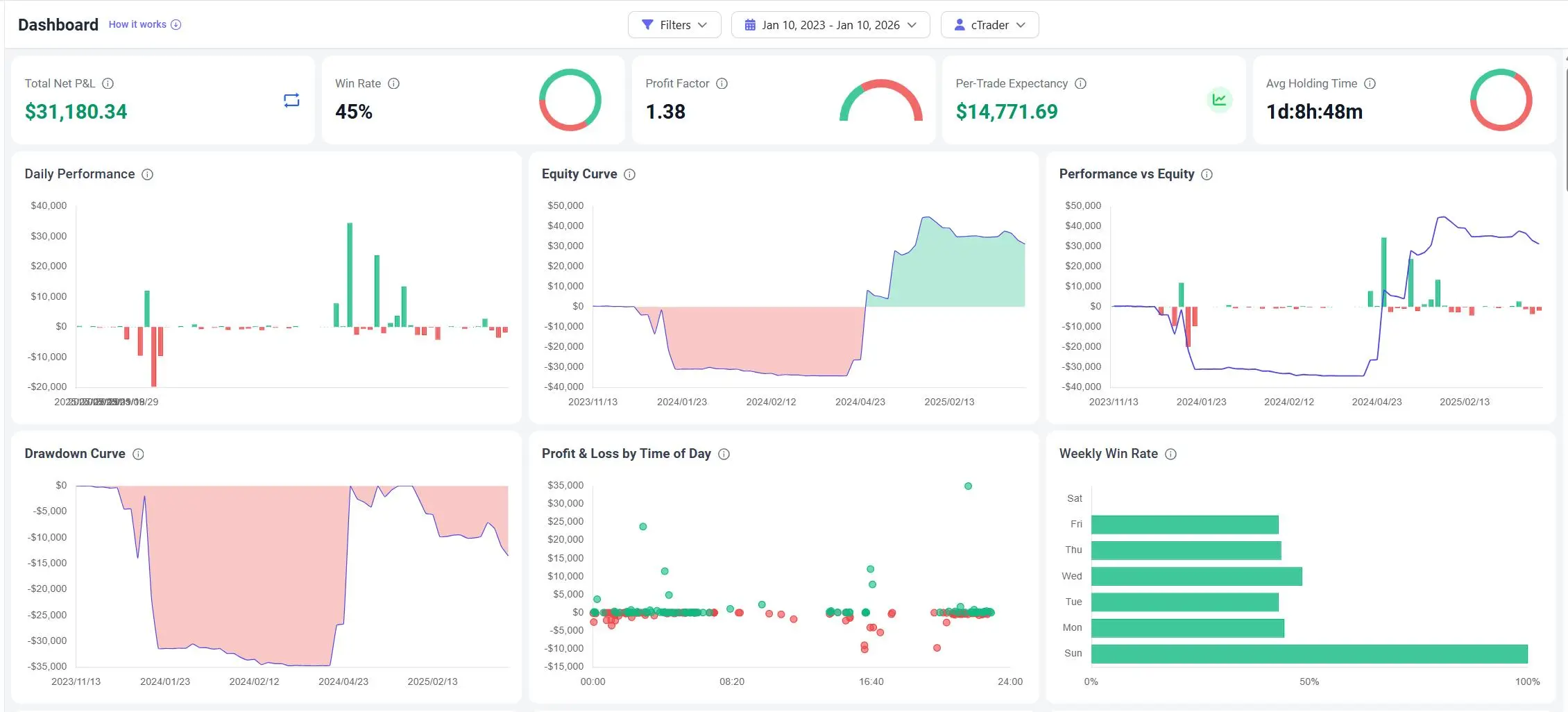
1. The Dashboard: Your Performance Hub
Go to your Dashboard to see the big picture.
- Equity Curve: Watch your account growth trajectory with all fees accounted for.
- Win Rate by Hour: Discover if you are overtrading during low-volatility hours.
- Profit Factor: See the efficiency of your strategy across all your cTrader accounts.
2. The Trades Table: Granular Review
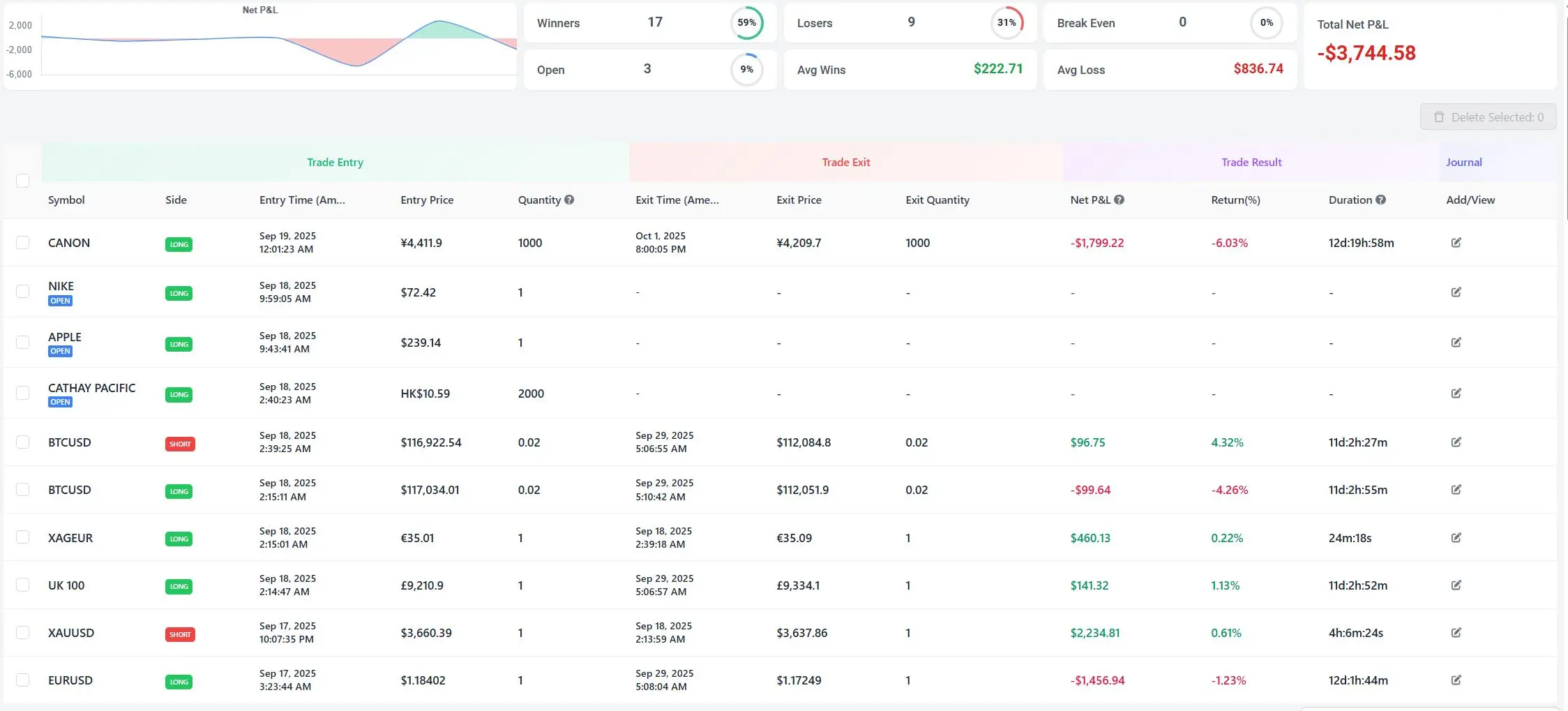
Go to Trades to drill down into individual executions.
- Smart Columns: View Entry Price, Exit Price, and Duration side-by-side.
- Filter by Symbol: Use the Symbol filter to isolate different instruments and see where your real edge lies.
Why a cTrader Journal is Better Than Excel
Excel is static and prone to breaking when cTrader updates its export format.
Multi-Asset Intelligence: Excel struggles to handle different point values (e.g., Indices vs. Metals) in the same sheet. We handle the CONTRACT_MULTIPLIER automatically.
True Net Logic: Manually subtracting Swaps and Commissions for every trade in Excel is tedious. We do it instantly.
R-Multiple Tracking: Excel doesn't automatically calculate your risk-adjusted return. We do.
cTrader FAQ
Does TradeBB support cTrader Copy Trading accounts?
Yes. If you are a Strategy Provider or a Copier, the trade history is generated in your account. We import the execution data so you can analyze the performance of the strategy, regardless of who executed it.
How do you handle cTrader's "Deal" vs "Position" logic?
cTrader logs individual deals (fills). Our engine groups these deals into coherent positions based on the Position ID, giving you a clean view of the entire trade lifecycle from open to close.
Can I import history from multiple cTrader brokers?
Do you track automated bots (cBots)?
Related Brokers

Broker not listed? Use Any Broker (AI) to upload your trade history file.


