

Binance Trading Journal: Master Your Spot & Futures Data
Stop trying to piece together your performance from fragmented CSV exports. In the crypto market, tracking your edge across Spot, USDT-M, and COIN-M Futures is a nightmare in a spreadsheet. TradeBB acts as your centralized binance trading journal, turning your raw export files into a unified, professional dashboard.
The Conflict: The "CSV Nightmare"
Binance is built for execution, not analysis. When you try to track performance manually using their export files, you hit a wall:
- Fragmented Data: Your Spot trades are in one file, Futures in another, and Funding Fees in a third. Merging them to see your total P&L takes hours.
- Hidden Costs: Basic spreadsheets often miss the impact of Funding Rates and BNB fee deductions, making your "Gross Profit" look better than your actual bankroll.
- Format Fatigue: You spend more time formatting columns and fixing timestamps than actually reviewing your strategy.
The Solution: Import, Merge, and Analyze
TradeBB acts as a data engine for your Binance exports. We bridge the gap between messy exchange logs and clear strategy review.
1. Unified Portfolio View (No Manual Merging)
Stop managing separate tabs for Spot and Futures. Simply export your trade history from Binance and upload the files to TradeBB. The system automatically merges your Spot buys/sells with your Futures longs/shorts into a single Trade Log.

2. True Fee Tracking
In crypto futures, funding fees can eat up your edge. TradeBB processes your exported fee data—including Maker/Taker fees and Funding Rates—to calculate your True Net P&L. If you pay fees in BNB, the system normalizes the cost into your reporting currency (e.g., USD), so you finally know your actual take-home profit.
3. Analyze Your "Win" Windows
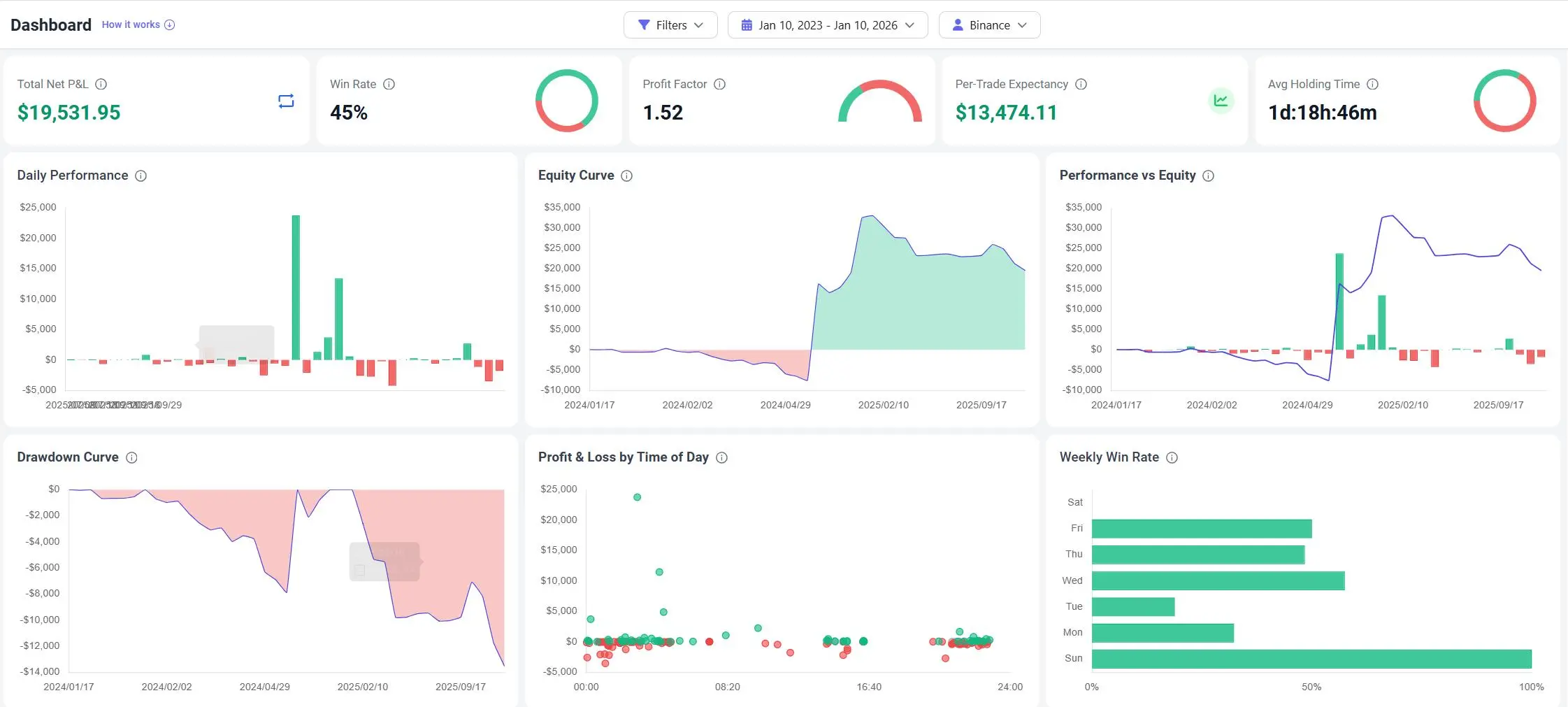
Crypto markets never sleep, but you should. Use the Binance Dashboard to analyze your P&L by Hour of Day based on your imported history. Discover if you are bleeding money during the Asian session while sleeping, or if your edge is strictly during New York hours.
The Workflow: From Export to Insight
The goal of a binance trading journal is to spend less time cleaning data and more time refining your strategy.
- Export: Log in to Binance and generate your "Trade History" or "Order History" statement (CSV/Excel) for the date range you want to review.
- Import: Upload the file to TradeBB. Our Any Broker (AI) engine recognizes the Binance format and maps the columns for you.
- Review: Open the Dashboard to check your unified Equity Curve and tag emotional trades (e.g., "FOMO") to track their cost.
The Verdict: TradeBB vs. Spreadsheets
| Feature | TradeBB (Import) | Manual Excel/Google Sheets |
|---|---|---|
| Data Merging | Auto-Merge Spot & Futures Files | Manual Copy-Paste (High Effort) |
| Fee Calculation | Auto-Calculates Funding & BNB Fees | Often Ignored/Inaccurate |
| Net P&L | True Net (After all costs) | Usually Gross P&L only |
| Time Analysis | P&L by Hour (Automated) | Hard to Calculate |
| Drawdown | Visual Drawdown Curve | Complex Formula Setup |
Binance FAQ
How do I export my data from Binance?
Go to your Binance "Orders" section, select "Transaction History" or "Trade History," choose your date range, and click "Generate" to download the CSV file.
Does this work for both Spot and Futures?
Yes. You can import export files from both your Spot wallet and Futures (USDT-M/COIN-M) wallets. TradeBB allows you to view them in a single dashboard or filter by account.
Is my data safe?
Yes. You are simply uploading historical data files for analysis. Since there is no API connection required, your account remains completely offline and secure.
Related Brokers

Broker not listed? Use Any Broker (AI) to upload your trade history file.


