
Futures Trading Journal for Clearer Trade Review
Import futures trades from supported brokers and platforms, organize contracts and accounts, and review P&L, commissions, strategies, tags, drawdown, and trading behavior in one journal.
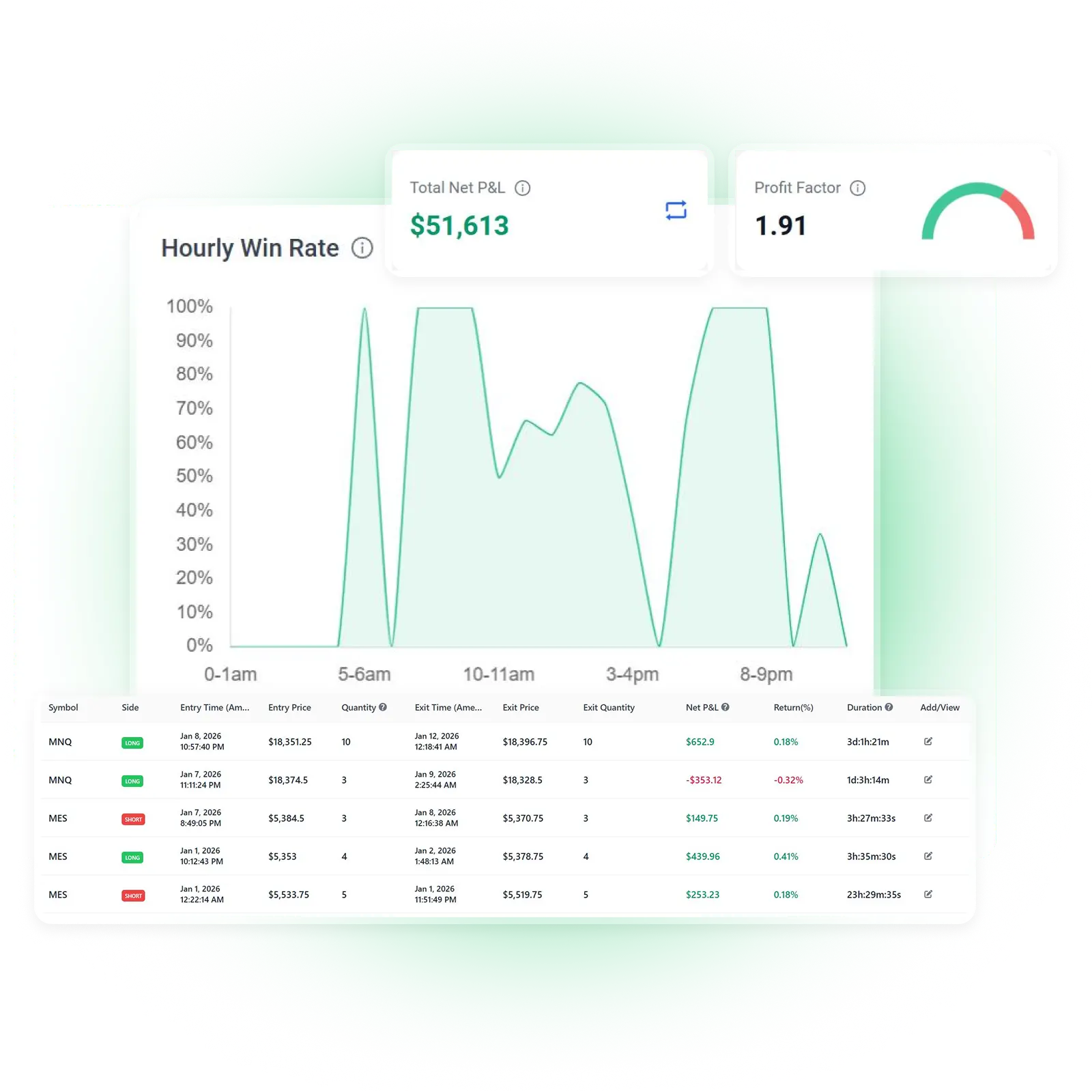
Import Futures Trades from Your Broker or Platform
Move beyond manually entering every fill into a spreadsheet. TradeBB helps you bring supported futures trading activity into one organized journal through broker sync, file import, or manual entry.
Broker Sync
Connect supported broker accounts in read-only mode and bring available trading activity into your journal.
File Import
Upload a supported trade history, statement, or execution file from your broker or trading platform.
Manual Entry
Add futures trades manually when you do not want to connect an account or do not have a supported file.
Popular futures-related integrations include:
Tradovate
Import supported Tradovate trade history and review contracts, commissions, daily results, strategies, and account-level performance.
NinjaTrader
Bring supported NinjaTrader execution or trade history files into TradeBB for structured futures trade review.
TradeStation
Import supported TradeStation futures activity and organize it by contract, strategy, account, and time period.
Interactive Brokers
Keep supported futures and other asset classes from Interactive Brokers in one multi-asset trading journal.
Rithmic R Trader
Upload supported Rithmic R Trader history and turn raw futures executions into an organized review process.
CQG
Import supported CQG trade history and review performance across contracts, strategies, tags, and accounts.
Import methods, historical coverage, contract information, commissions, and other available fields vary by broker, platform, and export format.
Your Trading Platform Records Fills. Your Futures Journal Reveals Patterns.
A trading platform can show when a contract was bought or sold. It rarely shows which trading habits, setups, markets, or account decisions are driving your longer-term results.
TradeBB turns completed futures trades into a structured review workflow.
Compare Futures Contracts
Review results across contract symbols such as ES, NQ, MES, MNQ, CL, GC, and other markets included in your imported data.
See which contracts contribute most to your results and which markets repeatedly underperform.
Keep Trading Costs Visible
Review commissions and fees when they are included in the broker data you import.
Compare gross and net results instead of allowing frequent trading costs to disappear inside a monthly account statement.
Identify Repeated Trading Behavior
Use custom tags to track overtrading, revenge trading, late entries, early exits, hesitation, moving stops, or any other behavior that affects your process.
Compare Broker Accounts
Keep personal accounts, supported funded accounts, and accounts from different brokers in one journal while retaining account-level reporting.
Analyze Futures Trading Performance from Multiple Angles
A useful futures trading journal should help you understand more than whether an individual trade made or lost money.
TradeBB organizes your trading history into reports that reveal where your results are coming from.
Overview Report
Review overall metrics such as P&L, win rate, profit factor, trade expectancy, average wins and losses, holding time, trade frequency, and trading costs.
Symbol Report
Compare performance across futures symbols and contract identifiers included in your trading data.
Identify which markets fit your trading process and which ones may be adding unnecessary losses or volatility.
Strategy Report
Create strategy names for the setups you trade and compare their performance over time.
Organize trades using categories such as opening-range breakout, pullback, trend continuation, mean reversion, reversal, or your own futures setups.
Tag Report
Measure the impact of mistakes, emotions, market conditions, execution decisions, and other custom factors attached to your trades.
Trading Calendar
Review futures trading activity by day, week, or month.
Spot patterns in daily P&L, trade frequency, losing streaks, and trading consistency across different periods.
Broker Account Report
Compare performance across supported personal, broker, and funded accounts.
Review account-level results, commissions, fees, deposits, withdrawals, and trading activity when the relevant information is available.
Build a Repeatable Futures Trade Review Process
TradeBB gives you a practical workflow for turning completed futures trades into useful feedback.
1. Import Your Futures Trades
Connect a supported broker where read-only sync is available, upload a supported trade history file, or add the trade manually.
2. Organize Trades by Strategy and Context
Assign strategies and custom tags to record the setup, market conditions, execution quality, mistakes, and behavior behind each trade.
3. Add Notes and Screenshots
Document the original trade idea, planned risk, entry reasoning, trade management, exit decision, lessons learned, and relevant chart screenshots.
4. Review Your Results
Use dashboards, reports, filters, and the trading calendar to compare contracts, accounts, strategies, tags, costs, and time periods.
5. Turn Patterns into Review Rules
Use repeated findings to create clearer rules for contract selection, position sizing, trading frequency, setups, and when to stop trading.
Add Context Behind Every Futures Trade
Performance statistics show the result. Your notes and classifications help explain how that result was produced.
Record the Trade Thesis
Write down why you entered the trade, what you expected the market to do, and what would invalidate the setup.
Document Trade Management
Record scaling decisions, partial exits, stop changes, target changes, and whether the original plan was followed.
Track Mistakes and Emotions
Create custom tags for FOMO, revenge trading, hesitation, overconfidence, overtrading, or other behaviors you want to measure.
Save Screenshots and Lessons
Attach chart screenshots and write a clear lesson while the trading context is still fresh.
Review Different Futures Trading Workflows
TradeBB can be used for different futures trading styles depending on the broker data and import method available.
Index Futures
Review trading activity across index futures such as ES, NQ, RTY, YM, and other supported contract symbols.
Micro Futures
Keep Micro E-mini and other micro futures trades organized separately from larger contracts so you can compare performance and behavior.
Energy and Metals Futures
Review supported trading activity in products such as crude oil, gold, silver, and other commodity futures included in your imported history.
Intraday Futures Trading
Analyze daily performance, frequent executions, holding time, commissions, strategies, and behaviors associated with scalping or day trading.
Multi-Account Futures Trading
Organize trades from different supported brokers and accounts without maintaining a separate spreadsheet for each one.
Funded Futures Accounts
Use account reports, tags, notes, and calendars to review funded-account trading separately from personal trading.
Traders who need a journal focused primarily on evaluation phases and funded-account workflows can also explore the prop firm trading journal.
What Should a Futures Trading Journal Track?
A futures journal should record both the transaction and the decision-making process behind it.
Useful information includes:
Trade and Execution Details
Contract symbol, contract month when available, direction, quantity, entry and exit prices, execution times, commissions, fees, and realized P&L.
Strategy and Setup
The setup that led to the trade, the market context, the reason for entry, and the conditions that would invalidate the idea.
Trade Management
Position sizing, partial exits, scaling decisions, stop changes, target changes, and whether the trade followed the original plan.
Notes and Screenshots
Chart context, observations, entry and exit reasoning, mistakes, and lessons to review later.
Trading Behavior
Emotions and behaviors such as FOMO, hesitation, revenge trading, overtrading, moving stops, or exiting too early.
Performance Results
P&L, win rate, profit factor, expectancy, average wins and losses, drawdown, trading costs, and performance by contract, strategy, tag, account, and time period.
Read the complete guide to what a futures trading journal should track.
Futures Trading Journal Software vs. a Spreadsheet
A spreadsheet can be a useful starting point when you only have a small number of trades to record.
As your futures trading history grows, manually maintaining executions, commissions, strategies, screenshots, account data, and reporting formulas becomes harder.
With TradeBB, you can:
- Import supported trading history instead of typing every execution
- Generate reports without maintaining spreadsheet formulas
- Review results by symbol, strategy, tag, and account
- Use a calendar to analyze daily and monthly activity
- Keep notes and screenshots connected to individual trades
- Filter trading history across different periods and accounts
- Organize multiple supported broker accounts
- Keep futures and other supported asset classes in one journal
Use a spreadsheet when you need a simple manual record.
Use TradeBB when you want broker imports, structured trade organization, automatically generated reports, and a repeatable review workflow.
Prefer to begin manually? Download a trading journal template before moving to automated imports and performance reporting.
FAQ
What is a futures trading journal?
A futures trading journal is a structured record of futures trades and the decisions behind them. It can include contracts, executions, entries, exits, quantity, commissions, strategies, notes, screenshots, mistakes, and performance results.
For a complete explanation, read What Is a Futures Trading Journal?.
Why should futures traders keep a trading journal?
Futures traders often manage frequent executions, different contract sizes, commissions, multiple accounts, and leveraged risk. A journal helps organize this activity so decisions can be reviewed using actual trading history instead of memory.
Can I import futures trades into TradeBB?
Yes. TradeBB supports trade imports from selected futures brokers and platforms. Depending on the integration, you may be able to use read-only broker sync or upload a supported trade history file.
Manual entry is also available.
Which futures brokers and platforms does TradeBB support?
TradeBB supports selected platforms such as Tradovate, NinjaTrader, TradeStation, Interactive Brokers, Rithmic R Trader, CQG, and others.
Available import methods and data coverage vary. Visit the supported brokers page to check your platform.
Can I add futures trades manually?
Yes. You can manually add futures trades when you do not want to connect a broker or do not have a supported trade history file.
Can I review futures performance by contract?
Yes. When contract information is included in your imported data, you can use symbol-level reporting and filters to compare results across futures contracts and markets.
Can TradeBB include futures commissions and fees?
TradeBB can include commissions and fees when those values are available in the imported broker data. Some broker exports do not include complete cost information, so available results depend on the file or connection used.
Can I track E-mini and Micro E-mini futures separately?
Yes. When the imported data contains distinct contract symbols, TradeBB can organize and report those symbols separately.
This can help you compare trading results and behavior across E-mini and Micro E-mini contracts.
Can I track multiple futures accounts?
Yes. TradeBB supports multiple broker accounts and provides account-level reporting so you can review accounts separately or as part of a broader trading history.
Can I use TradeBB for funded futures accounts?
Yes. You can import supported funded-account trading activity and use account reports, calendars, strategies, tags, and notes to review it.
TradeBB does not guarantee that a trader will pass an evaluation, avoid a rule breach, or receive a payout.
Does TradeBB automatically analyze order flow or historical market data?
TradeBB currently focuses on completed trade imports, execution history, performance reports, strategies, custom tags, notes, screenshots, calendars, and account-level review.
Order-flow observations, market conditions, and execution context can be documented using strategies, notes, screenshots, and custom tags.
Is broker sync read-only?
Yes. Supported broker connections are read-only and are used to retrieve trading activity for journaling and performance review. They cannot place trades or move funds.
Does TradeBB provide futures signals or trading advice?
No. TradeBB is a trading journal and performance review platform. It does not provide trading signals, trade recommendations, or investment advice.
Turn Your Futures Trading History into a Review Process
Stop leaving your trading lessons inside broker statements and disconnected spreadsheets. Import supported futures trades, organize your setups, add context, review trading costs, and identify the patterns behind your results with TradeBB.