 TradeBB
Swing trades last weeks. Your reasons should too.
You opened this position three weeks ago. Can you still say why? A day trade is over before you've forgotten it. A swing trade runs through earnings, a weekend and a gap, and by the time you close it your reasoning has quietly rewritten itself to fit the result. TradeBB keeps the reasoning where you left it — on the position, dated, unedited by hindsight.
The notebook
Why people still buy paper notebooks for this
Search for a swing trading journal and half the results are physical notebooks. That isn't silly. Swing trading has a slow rhythm — you take a position, then think about it for two weeks — and a notebook fits that rhythm better than a fast data tool does. Where it breaks is later.
- Week three — the entries get shorter, then stop; nothing forces the next one
- At the exit — the page you wrote at entry is somewhere in the back, and you don't go looking
- After a year — sixty entries in handwriting, and no way to ask whether your long holds beat your short ones
TradeBB keeps both halves: the written thesis, and the arithmetic the notebook can't do.
Entry thesis
Write it down before the outcome edits it
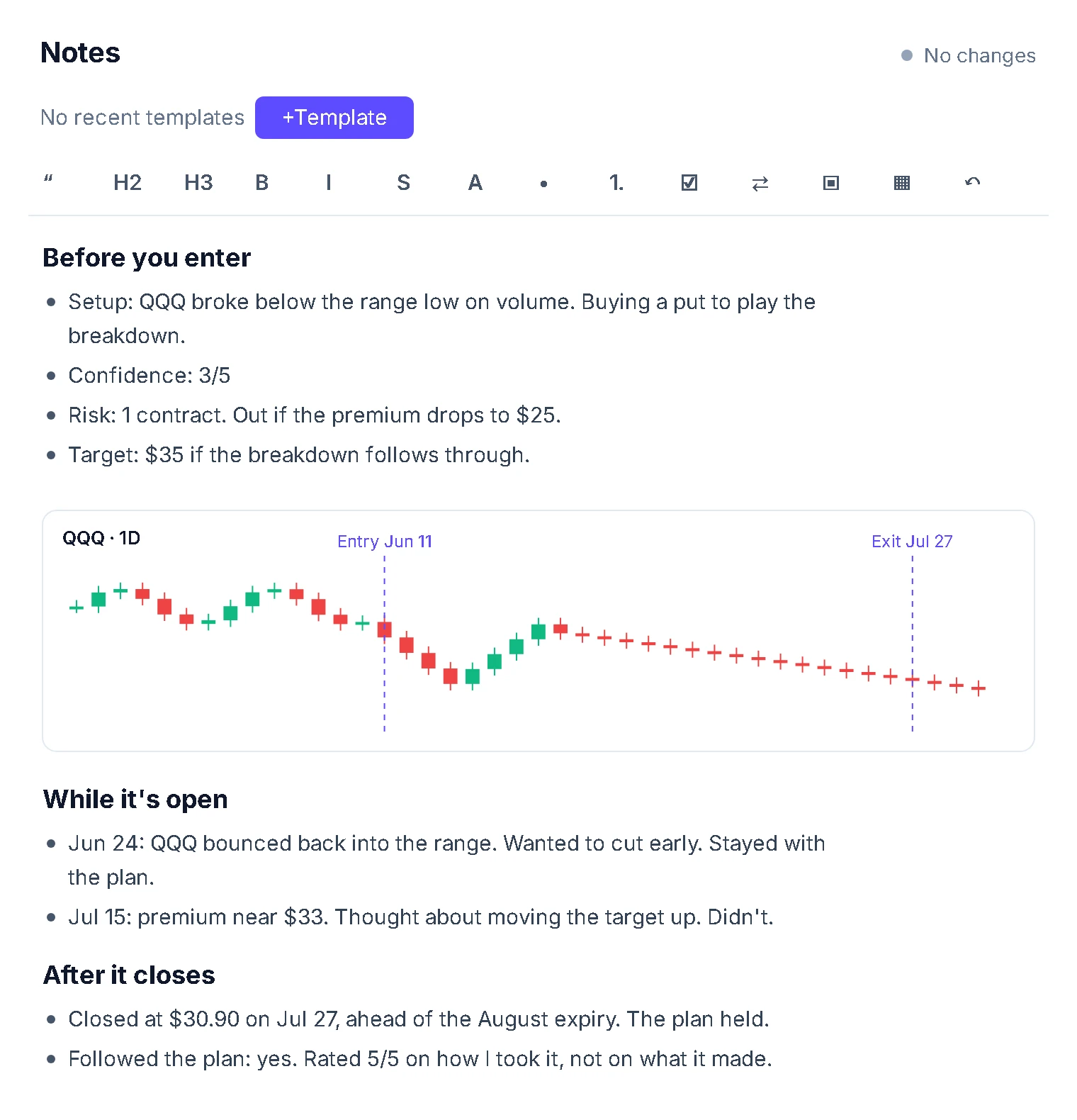
A swing trading journal in TradeBB is a note written at entry — why this setup, what would prove you wrong, where you'd take profit, how long you expect to hold — attached to the position and dated, with the trade's result filled in beside it when it closes. Every trade has a notes editor with a reusable template, so you answer the same four questions each time instead of facing a blank page.
- Why this setup — the pattern, the level, the catalyst you're expecting
- What proves you wrong — the invalidation, not just the stop price
- Where you'd take profit — and why there
- How long you expect to hold — through earnings? until a level breaks?
Then leave it alone. When the trade closes, that note is the only honest record of what you actually thought.
Hold time
Find out whether holding longer actually pays you
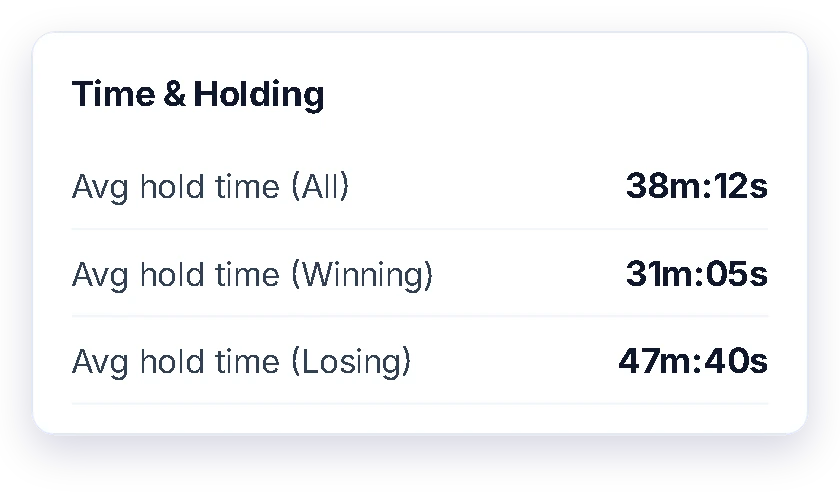
Every swing trader has a hunch about their ideal hold. Few have the number. TradeBB records how long each position was open and reports results by duration, so a hunch becomes a comparison.
- P&L by hold time — your two-day trades against your two-week trades, on one chart
- Average hold, winners vs. losers — whether you cut the good ones early and sit in the bad ones
- Filter to multi-day only — set Holding Period to multi-day and look at just your swings
- Overnight costs counted — on forex and CFD positions, swap is recorded on the trade
The usual discovery: you're patient with losers and impatient with winners. The report makes it hard to keep believing otherwise.
The weekly review
Review by the week, not the minute
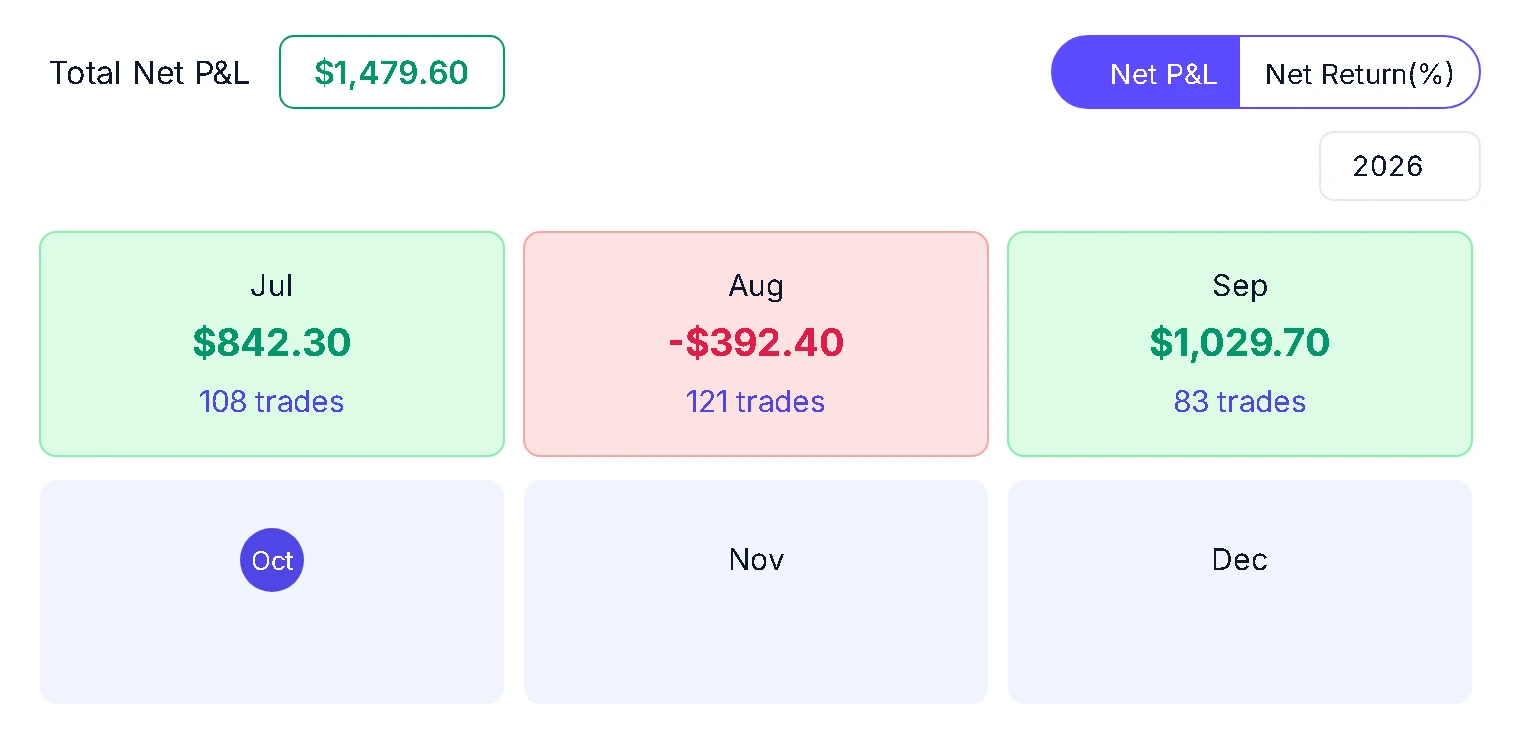
You don't need to look at this every day, and you shouldn't have to. A swing journal is read on Sunday. TradeBB's calendar and reports are built to be read at that rhythm.
- Week and month views — results by week and by month, each with the trades underneath
- Year at a glance — twelve months on one screen, so a good quarter and a bad one are both visible
- What's still unreviewed — filter to trades with no notes; with a few positions a month, the list is short
- Trades already there — imported from your broker, so the Sunday review is reading and writing, never typing
Sixty trades a year is a small sample. Each one deserves a line.
Import
Scaling in over a week is still one trade
Swing positions are rarely one order. You buy a third, add on the pullback, sell half into strength, close the rest a week later. The trading journal imports every execution from your broker and keeps them under one position, so the P&L, the hold time and the note all belong to the trade you actually took.
- Every execution under its position — adds and partial exits stay together
- From your broker — connect MetaTrader, cTrader or Interactive Brokers directly, or upload a trade history file from any other broker
- Positions still open — an open swing shows up as open, with its note, until you close it
FAQ
Frequently asked questions
Is a swing trading journal different from a day trading journal?
Same tool, different questions. A day trader asks which hour of the day pays; a swing trader asks whether the thesis held over two weeks and whether longer holds beat shorter ones. TradeBB reports by hour for the first and by hold time for the second — you just look at different pages.
Isn't a notebook enough for a few trades a month?
For the writing, yes. What a notebook can't do is add up: after a year of entries you still can't say whether your three-week holds outperform your three-day ones. TradeBB keeps the note and does the arithmetic.
What should I record in a swing trading journal?
Four things at entry — why this setup, what would prove you wrong, where you'd take profit, how long you expect to hold — and one honest line at exit about whether the thesis held. The template asks these every time.
How does TradeBB handle scaling in and partial exits?
Every execution imports and stays under its position, so a trade built from five executions over a week is reported as one trade with one hold time and one result.
Does TradeBB work with my broker?
MetaTrader, cTrader and Interactive Brokers connect directly; other brokers import by trade history file. See the integrations page.