 TradeBB
See what each options strategy actually nets
Calls, puts, verticals, condors, covered calls. Every contract comes in with its buys, sells and commissions, priced at full contract size. Select a spread's legs, pick its strategy once, and the report adds them up.
By contract
One contract, one trade — however many orders it took
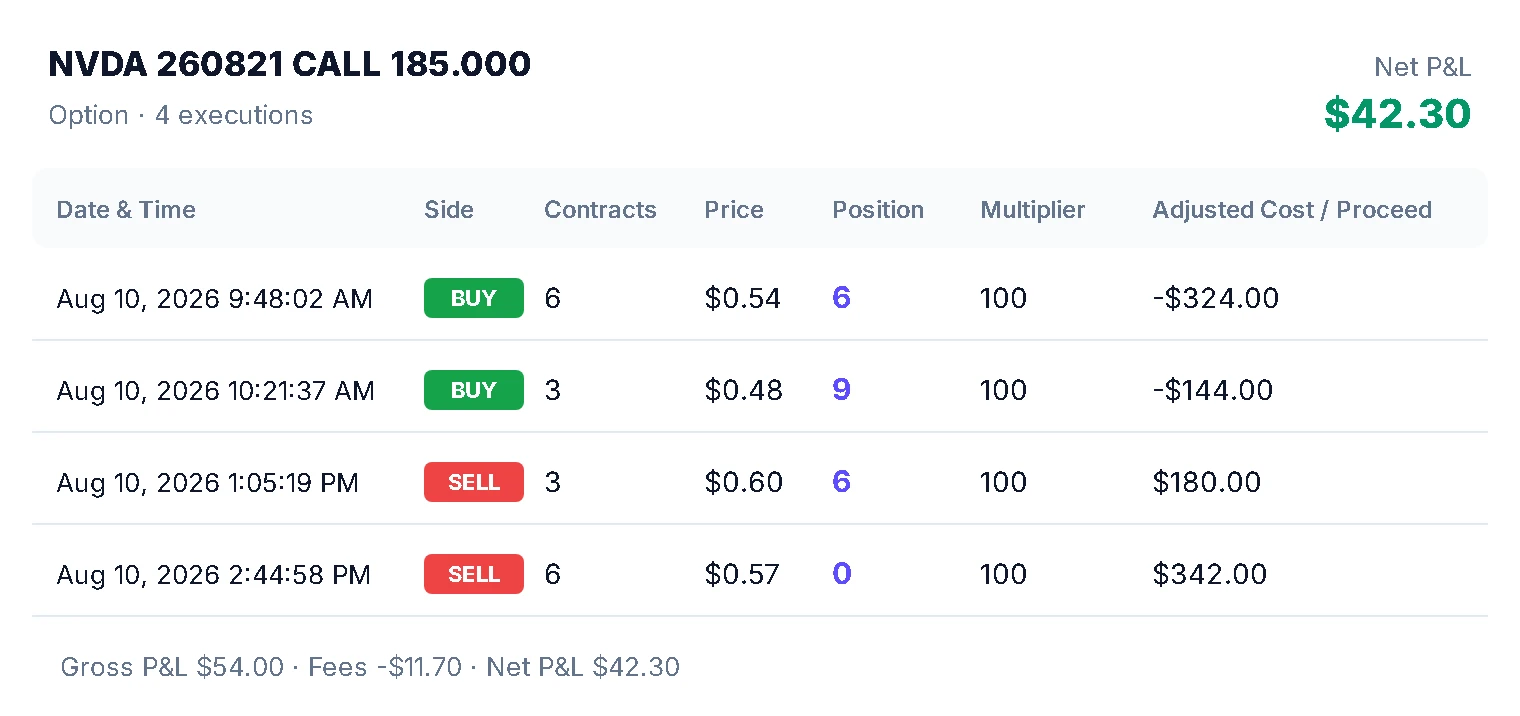
TradeBB joins every buy and sell of the same contract — same underlying, expiration, strike, call or put — into one trade. Bought in three pieces and sold in two? That's one trade with five lines under it. Take the position back to zero and open it again, and the next one is a new trade.
- Partial entries and exits — one trade, every order kept underneath
- Full contract size — a 1.20 premium is $120 a contract
- Every commission counted — charged per order, so net means net
- Back to zero, new trade — reopening the same contract starts fresh
So the trade in your journal is the position you actually held, priced the way your broker charged it.
Spreads
A spread is two trades. Its strategy adds them up.
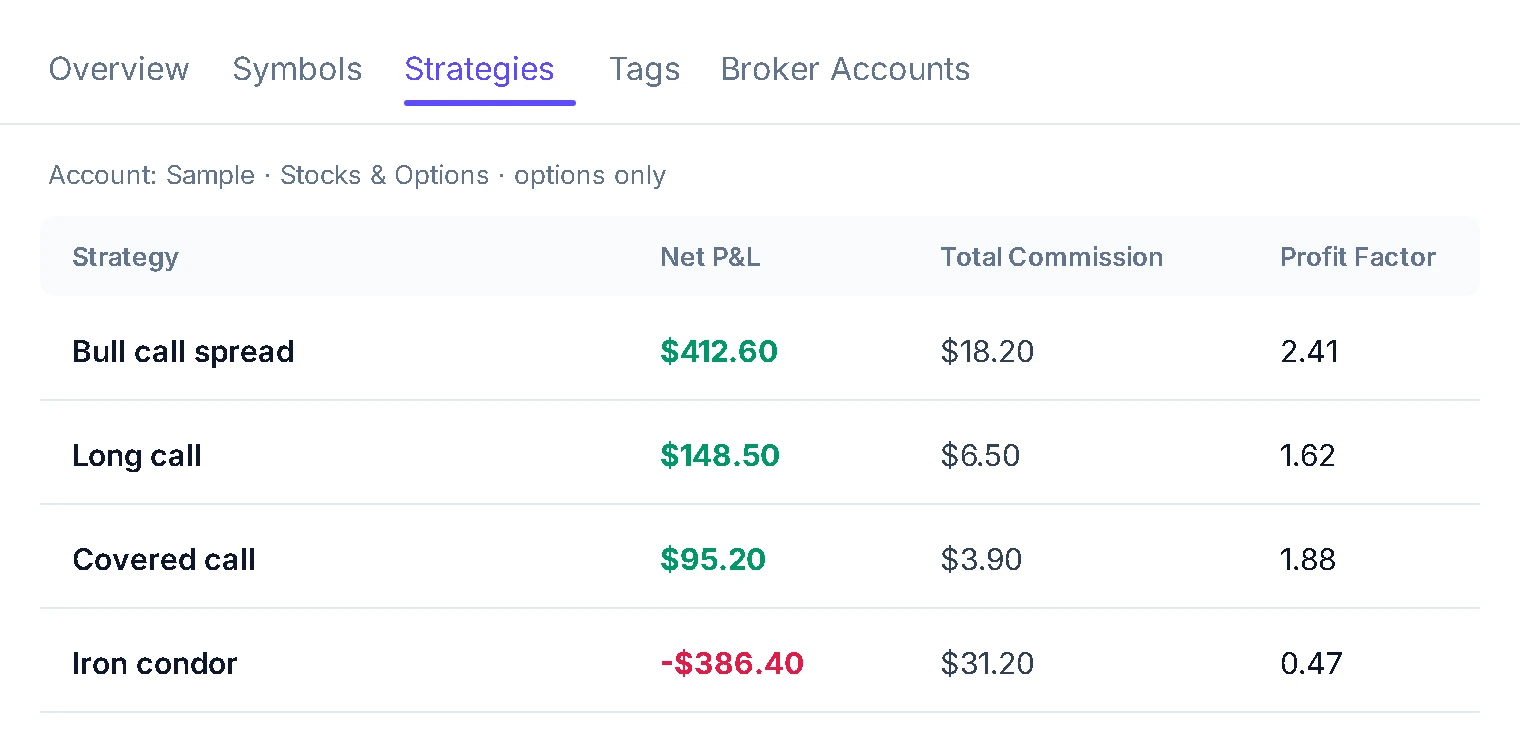
In TradeBB each leg is its own trade — a vertical is two contracts, a condor four. Select the legs, pick one strategy for all of them, and the Strategies report adds them together, after every commission.
- Each leg, its own trade — two for a vertical, four for a condor
- One strategy, every leg — select the legs, pick it once
- Net P&L by strategy — legs added together, after every fee
- Any structure you name — add a strategy the first time you trade it
Most options traders have a view on which strategy suits them. Far fewer have the net number to back it up.
Expiry & assignment
Expired options close themselves
An options position can end without you placing an order: it expires, or someone exercises against you. An option still open after its expiration date is closed at zero on that date, and it counts in your results from then on.
- Expired worthless — closed at zero: premium kept, or premium lost
- Assigned — the shares arrive as a stock trade when your broker reports them
- Still yours to edit — open the trade and change its orders if needed
For a seller, expiring worthless is the whole point of the trade. It belongs in your results, not stuck as an open trade.
Stocks & options
An options trading journal that adds up the whole wheel
Cash-secured puts, covered calls, the wheel — many retail options strategies involve shares too. TradeBB keeps your stock and options trades in the same account. Give the put you sold, the shares you were assigned and the calls you wrote against them one strategy, and the Strategies report shows what the whole wheel netted.
- Every piece, one strategy — the puts, the shares, the calls
- Every premium counted — each put and call you sell adds to the net
- Assignments — the stock trade lands beside the option that caused it
- The full cycle — once the shares are called away, the net is complete
Most wheel traders know their premium income. The number that matters is premium plus what the shares did.
Trade notes
Write down why this structure, before it plays out
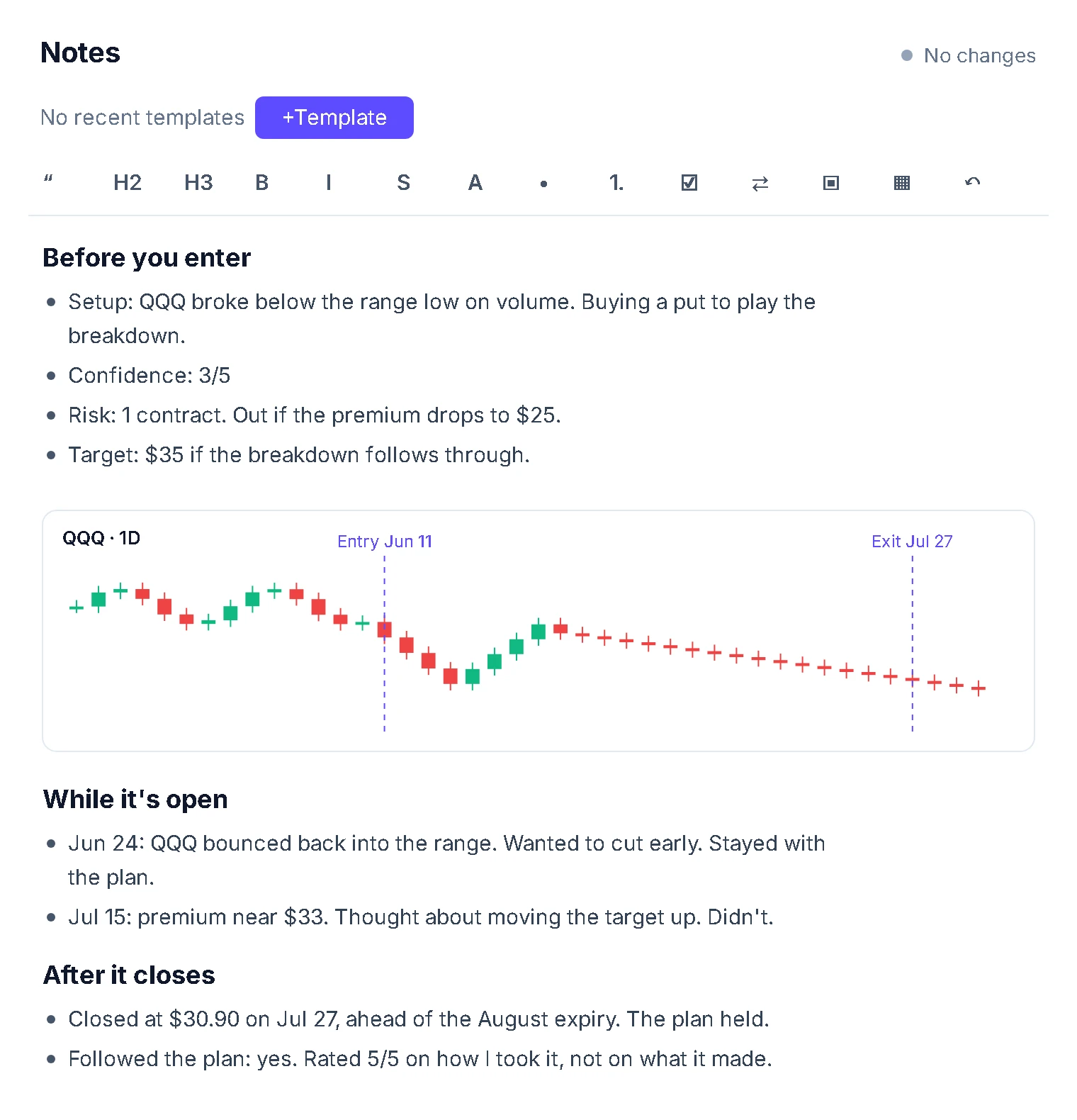
Your broker records what you traded. It doesn't record why you chose a condor over a strangle, or why you picked that width. Every trade has a notes editor with reusable templates, so the questions are already on the page when you sit down.
- Why this structure — and what you'd have used instead
- Your volatility view — selling a rich premium, or buying into an event
- Your exit rule — a profit target, a loss limit, a date to get out
Afterwards, that note is the only honest record of what you actually thought.
Review habit
More legs, more events, more reasons to stop journaling
Options give you more legs, more orders and more things happening to each one — expirations, assignments, rolls. That's a lot to write up by hand. A trading journal you keep is one where the trades are already in and the backlog has an end.
- Imported, never typed — every leg arrives from your broker
- A finite list — filter to unjournaled trades, work through them, done
- A strategy and a line — one pick and one sentence per trade
Pick the strategy, write the line, watch the list get shorter. That's the whole habit.
Brokers
Bring in the broker you already trade options with
Connect your broker account, or export your trade history and upload it. TradeBB reads each contract — underlying, expiration, strike, call or put — and builds your trades from it.
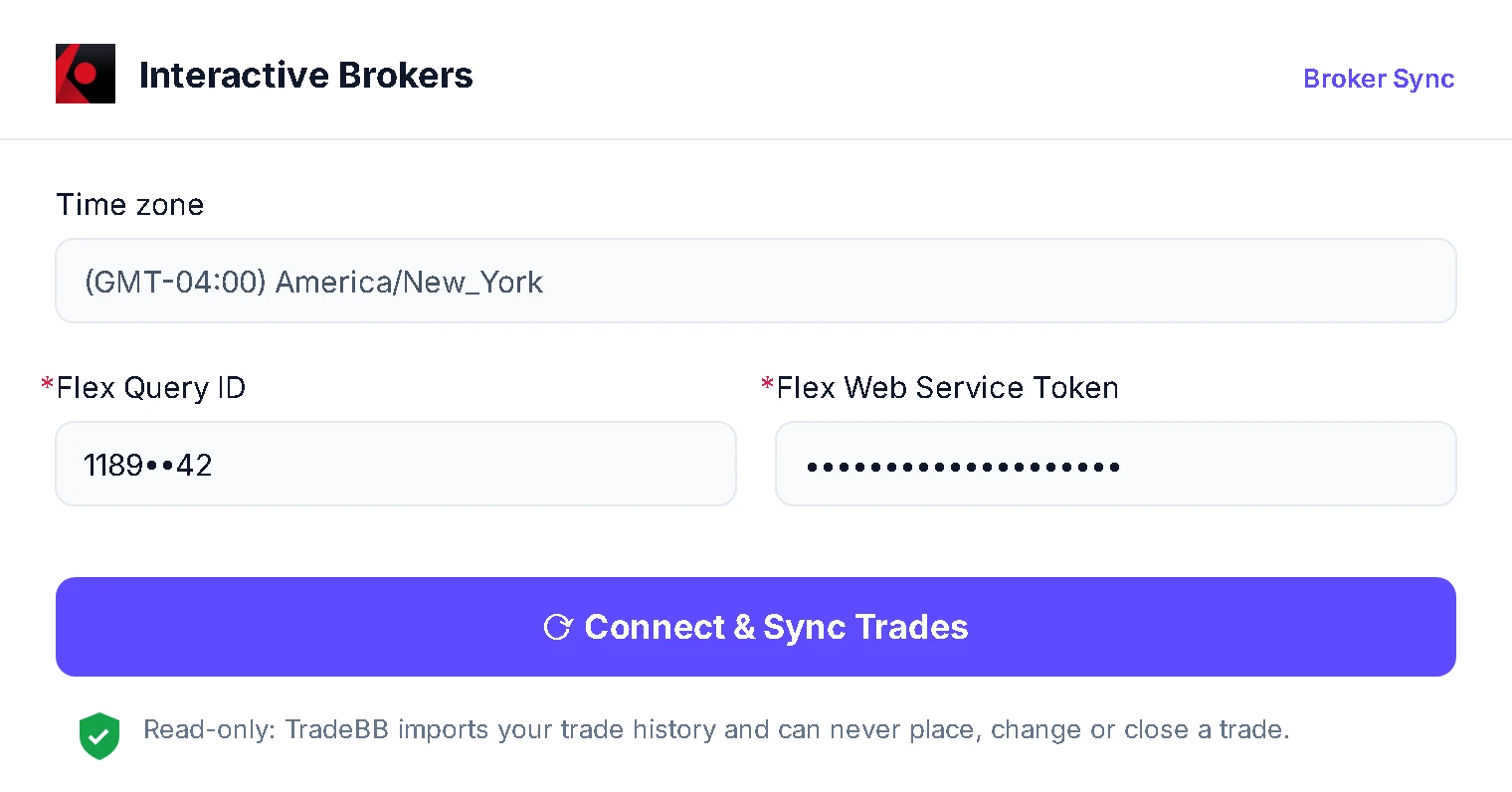
- Interactive Brokers — connect once through a Flex Query; it syncs on its own
- tastytrade, Schwab and ThinkorSwim, Robinhood, Webull, E*Trade, Fidelity, TradeStation, Tradier — connect the account, or upload the export
- Anything else — upload the file; Any Broker (AI) reads it
Step by step: Interactive Brokers trading journal · all supported brokers
Setup guides: Interactive Brokers · thinkorswim · Robinhood
FAQ
Frequently asked questions
What is an options trading journal?
More than an options trading log: a record of every trade you've taken — the contract, the orders, the costs, the strategy and what you were thinking — organized so you can see which strategies make money and which don't. A broker statement lists orders; a journal turns them into trades you can review.
What should I record for each options trade?
The contract — underlying, expiration, strike, call or put — and every order with its price and commission. Then the parts no broker records: the strategy, why you chose it, and your exit rule. In TradeBB the first part comes in with your trades; the second goes in the trade's notes. For a full walkthrough, see how to track options trades.
What does a journal do that a spreadsheet doesn't?
The arithmetic. Contract size, every commission and the orders that make up each trade come in with the import, so nothing is typed and nothing is off by a factor of 100. Your time goes on the strategy and the note, which is the part a spreadsheet was never going to fill in for you.
How do I see what a spread made?
Each contract is its own trade, so a vertical is two trades and an iron condor is four. Select the legs, pick one strategy for all of them, and the Strategies report adds them up. Trade counts and win rates in that report are counted per leg, so read a spread strategy by its net P&L.
How does TradeBB decide what counts as one trade?
Every buy and sell of the same contract — same underlying, expiration, strike, call or put — goes into one trade until the position is back to zero. Opening it again after that starts a new trade.
What happens to expired or assigned options?
An option still open after its expiration date is closed at zero on that date, so it counts in your results. If you were assigned, the shares come in as a stock trade when your broker reports them. You can still open any trade and edit its orders.
How should I handle rolls?
Closing one contract and opening another is two trades, because they're two contracts. Give every contract in the roll the same tag, and the Tags report shows what the position netted across all its rolls.
Can I keep the Greeks with a trade?
Write them in the trade's notes: the delta, theta or implied volatility you used to decide. Add them to a note template and the question is on the page for every trade.
Does TradeBB suggest options trades?
No. It records and analyzes trades you've already made, and doesn't provide investment advice or trading signals.
Start your options journal. See what each strategy nets.
By the end of the month you'll have a net number for every strategy you run — and one of them will be smaller than you thought.