

Automated NinjaTrader Trading Journal: Go Beyond the "Trade Performance" Window
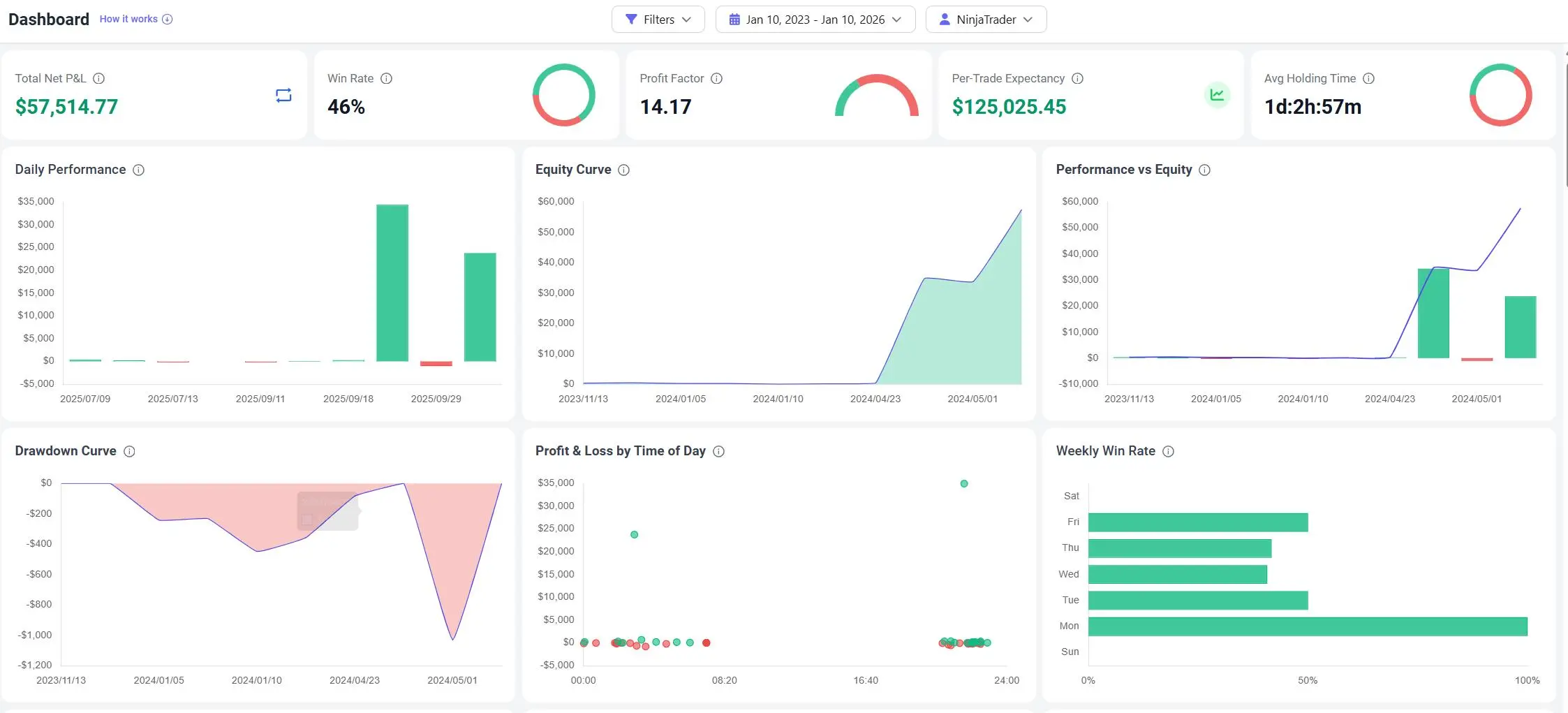
NinjaTrader 8 (NT8) is a powerhouse for execution and charting. But analyzing your historical performance inside a desktop platform often feels clunky. The native "Trade Performance" window gives you the stats, but it lacks the narrative. It tells you what you earned, but not why you won or lost.TradeBB serves as your dedicated ninjatrader trading journal, transforming raw export files into a cloud-based analytics engine. We bridge the gap between your execution platform and your review process, helping you spot behavioral leaks without manual data entry.
Why Your Desktop Platform Isn't a Trading Journal
Many traders struggle to improve because they treat their execution platform as their diary.
While NinjaTrader offers detailed reports, the data remains trapped on your local machine. It’s static. You can’t easily tag a trade as "Revenge Trading" to see how much that specific emotion cost you last month. You can't filter your equity curve to see how your "Trend Following" setup performs specifically on NQ versus ES.
To truly professionalize your trading, you need to separate execution (NinjaTrader) from analysis (TradeBB).
Does it work with NinjaTrader 7?
Our AI Import tool is primarily optimized for NinjaTrader 8 formats, as it is the industry standard. However, since the "Any Broker (AI)" feature is flexible, it can often map NT7 columns successfully. We recommend upgrading to NT8 for the best data consistency.
Seamless CSV Import for NinjaTrader 8
Stop fighting with column mapping in Excel. TradeBB makes it simple to import NinjaTrader export files directly into your dashboard.
1. Simple File Upload
Whether you are exporting from the "Executions" tab or generating a "Statement," our Any Broker (AI) engine is trained to recognize NinjaTrader's specific CSV formats.
- No Templates Needed: You don’t need to rename columns or delete headers. Just upload the file as NT8 generates it.
- Bulk Processing: Upload weeks or months of history in seconds. We parse the fills and reconstruct the trades automatically.
2. Centralized Dashboard
Once imported, your localized trades become a dynamic ninjatrader journal.
- Cloud Accessibility: Review your charts and metrics from any browser, not just your trading desk.
- Unified View: If you trade Prop Firm accounts on NinjaTrader and a personal account on another broker, TradeBB combines them into one normalized view.
The Data Integrity: Normalizing Futures Data
For futures traders, a generic spreadsheet often fails. A point on ES is 50,while apointon MNQ is 2. If your journal treats them the same, your data is useless.
TradeBB is built with a deep understanding of the futures market
Contract & Fee Normalization
When you import from NinjaTrader, we don't just copy the numbers; we understand the instrument.
- Tick Value Awareness: We automatically apply the correct multipliers for major contracts (Indices, Energy, Metals), ensuring your P&L curve matches your actual account balance.
- Net P&L Tracking: NinjaTrader exports often separate commissions from Gross P&L. Our engine subtracts exchange fees, NFA fees, and commissions to show your true "take-home" performance.
- Rollover Handling: Trade continuous contracts without breaking your statistics.
The Verdict: TradeBB vs. Excel vs. NT8 Performance
Why move your data out of NinjaTrader?
| Feature | NinjaTrader "Trade Performance" | Excel Spreadsheet | TradeBB Journal |
|---|---|---|---|
| Accessibility | Desktop Only (Local) | Manual / File-based | Cloud / Any Device |
| Data Entry | Automatic (Internal) | Manual Copy-Paste | Automated CSV Import |
| Behavioral Analysis | None | Manual text columns | Mistake Tagging (e.g., FOMO) |
| Futures Logic | Native | Complex formulas required | Automated Multipliers & Ticks |
| Goal | Reporting & Stats | Record Keeping | Strategy Optimization |
Master your execution. Sync your NinjaTrader history now and turn your raw fills into a professional review process.
NinjaTrader FAQ
How do I export my trades from NinjaTrader for the journal?
In NinjaTrader 8, go to the Trade Performance window, select the Executions or Trades tab, right-click on the grid, and select "Export". Save the file as a CSV. You can then upload this file directly to TradeBB using our import tool.
Does this trading journal support Futures contracts like ES and NQ?
Yes. TradeBB is optimized for futures. We automatically handle contract multipliers (e.g., 50/pointforES,
Can I combine my NinjaTrader Sim/Playback trades with Live trades?
You can import both. We recommend using separate "Portfolios" or "Accounts" within TradeBB if you want to keep your Simulated performance separate from your Live capital. This allows you to validate strategies in NT8 Playback mode before risking real money.
Why is my NinjaTrader P&L different in Excel?
NinjaTrader often exports "Gross P&L" by default, or separates commissions into a different column. If you simply sum the P&L column in Excel, you miss the costs. TradeBB parses both P&L and Commission fields to give you an accurate Net P&L [Source: 1156].
Related Brokers

Broker not listed? Use Any Broker (AI) to upload your trade history file.


