
An MT5 trading journal that connects to your broker — not your terminal
A trading journal for MT5 traders: every MetaTrader 5 trade — pairs, lots, stop, target, swap, commission — from XM, Exness, ATFX and most MT5 brokers. Read-only, nothing to install, and MT5 can stay closed
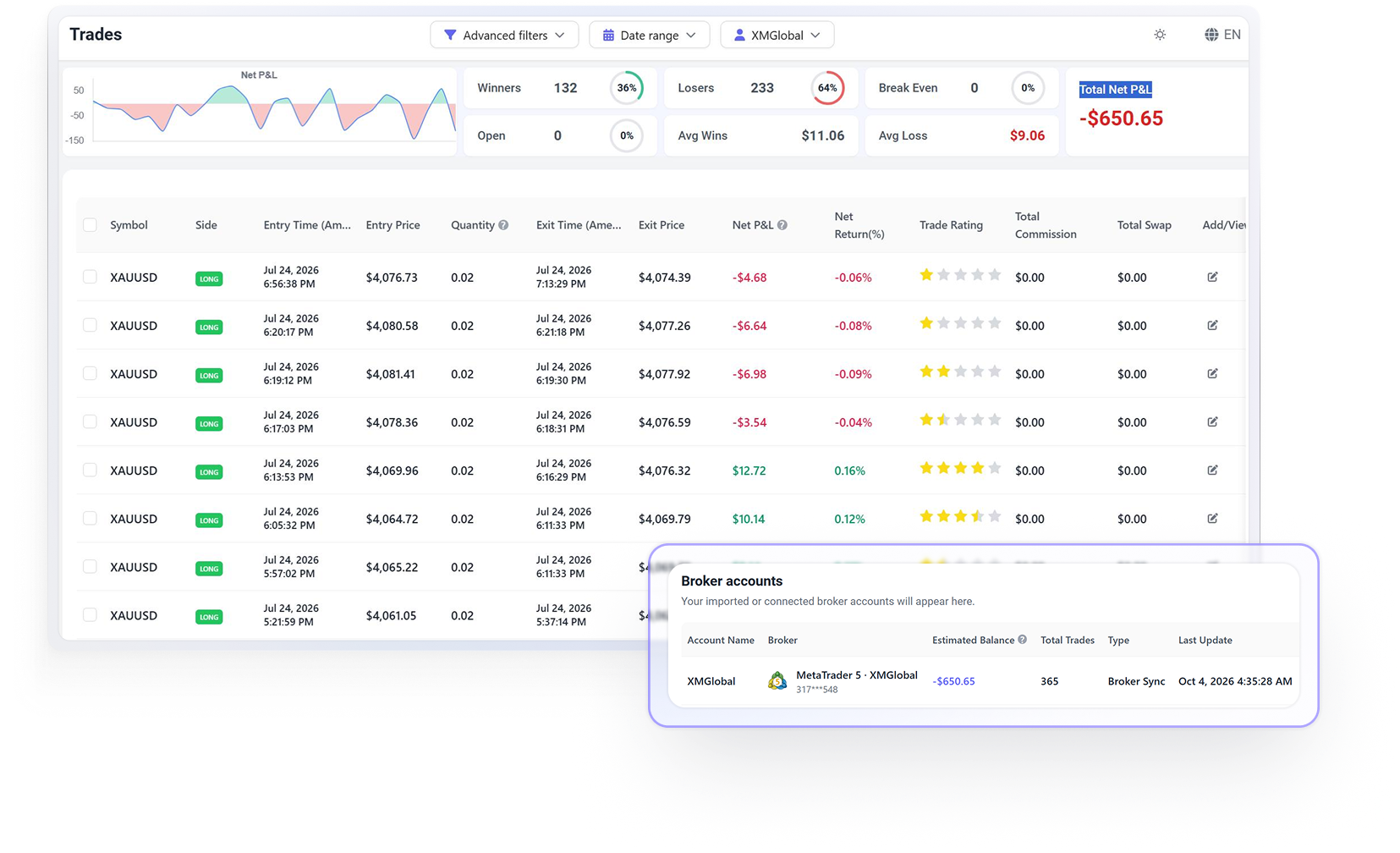
Five steps once
Then it syncs on its own
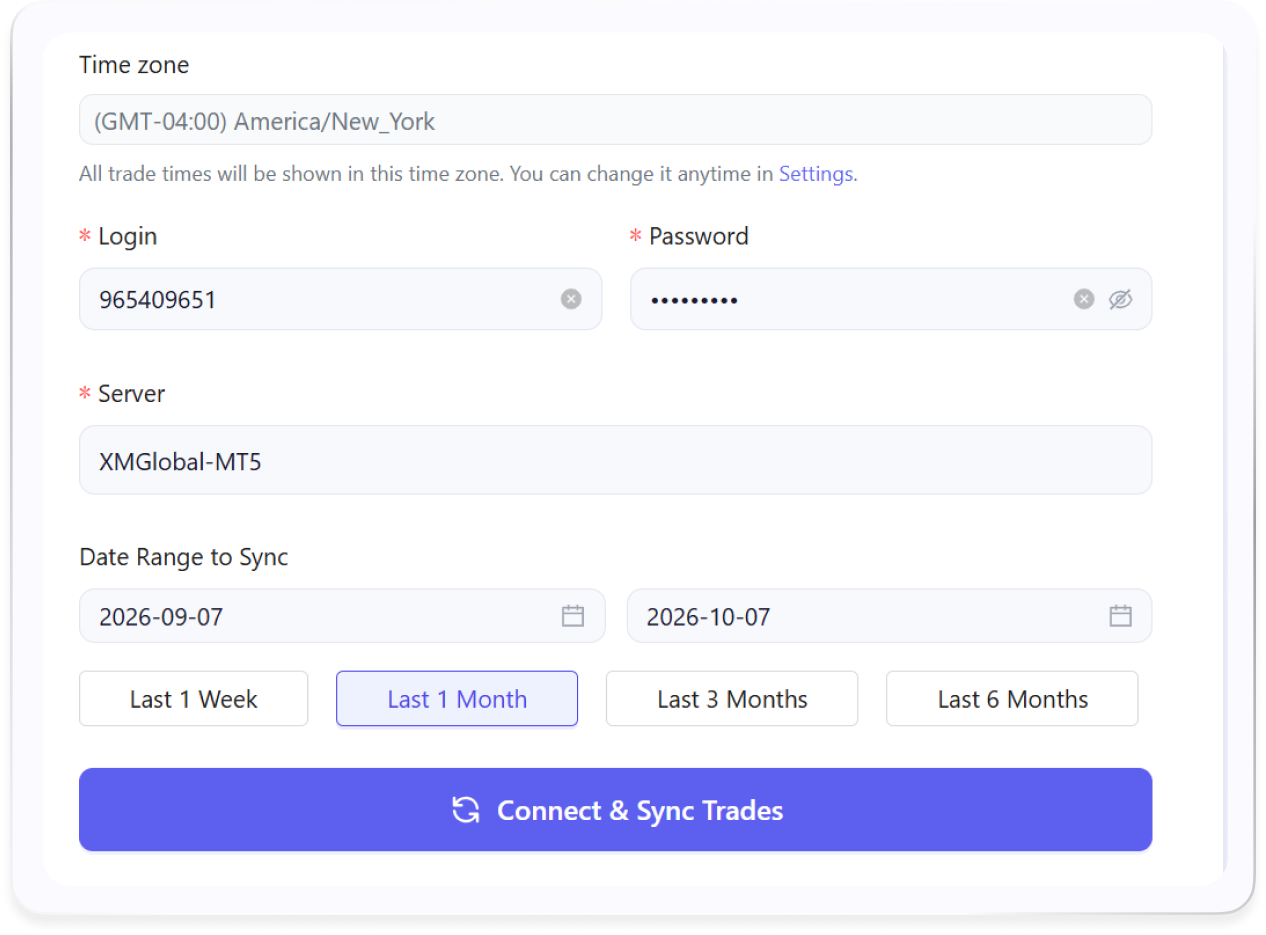
TradeBB connects to your broker's MT5 server with a read-only login. Set it up once; after that, it syncs on the schedule you choose — or sync by hand right before a review. The Last Update time shows when it last synced
Server name
Bottom of your MT5 window, e.g. XMGlobal-MT5 2 or Exness-Real12
Investor password
In your broker's welcome email, or MT5's Mailbox tab. Read-only by design
Nothing to install
No Expert Advisor, no script, no plugin in your terminal
MT5 can stay closed
The connection is to your broker's server, not your desktop
Your schedule
Choose how often it syncs, or sync by hand
No export, no upload, no file to find. When you sit down to review, your new trades are already there
Have the investor password?
If your broker runs MT5,
you're almost certainly covered
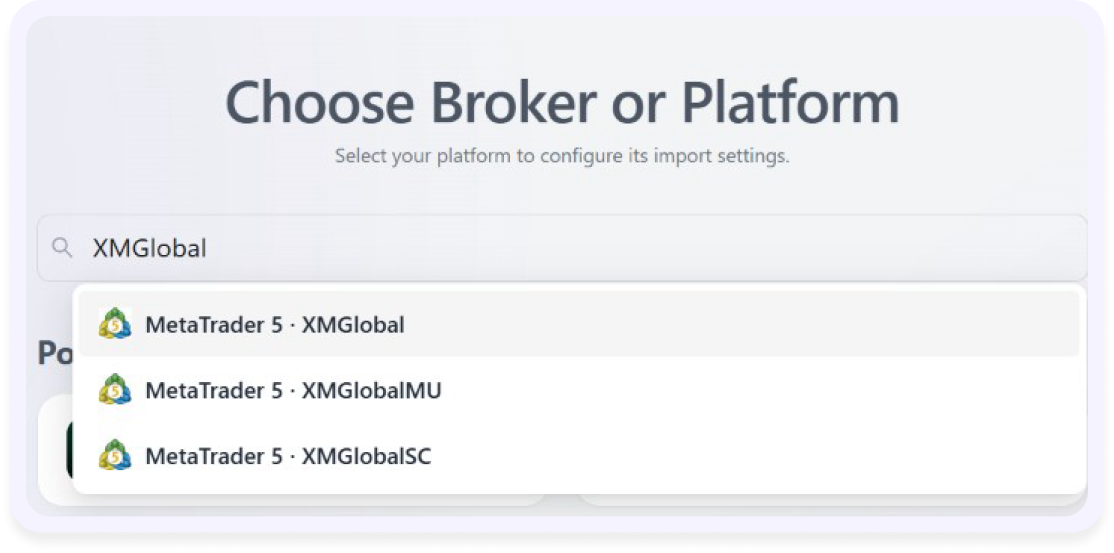
TradeBB doesn't keep a hand-picked list of MT5 brokers. It connects by server name — the same name you see in your terminal — so any broker running MetaTrader 5 can be found by searching for its server. Ask traders joining TradeBB which broker they use, and MetaTrader 5 is the most common answer — more than any single broker
- Verified— XM, Exness and ATFX, regional servers included
- Not listed by brand?— search for the server name instead; that's how the connection works
- Prefer not to connect?— upload an MT5 report instead; steps below
- Not on MT5 at all?— upload your file and Any Broker (AI) reads it
Your broker being small, regional or new is not a reason it won't work
Have an MT5 report?
Upload it — history or backtest
If you'd rather not link a live account, MT5 can hand you a report and you drop it into TradeBB. A few more steps each time — and nothing of yours stays connected in between
Your trade history
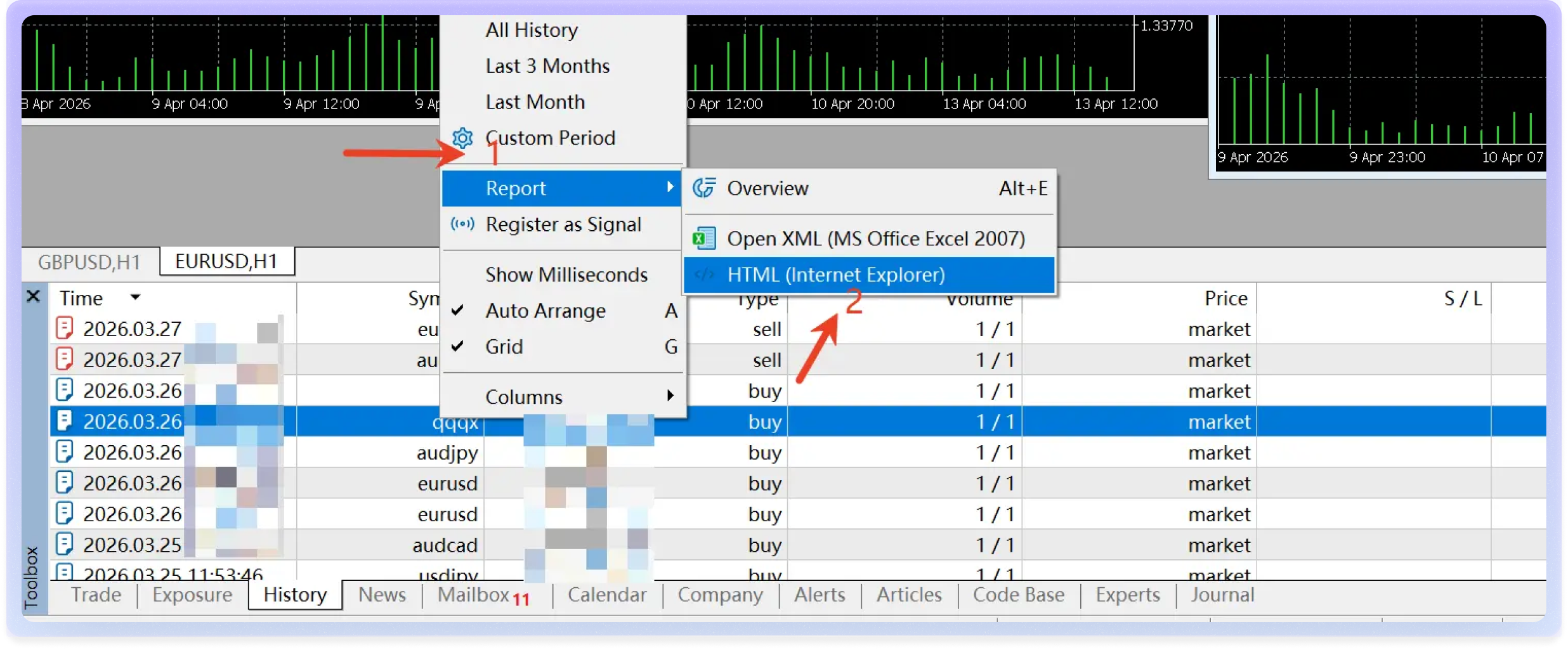
- In MT5, open the Toolbox and click the History tab
- Set the date range to cover the trades you want
- Right-click the list → Report → Open HTML (the detailed report)
- Save the file, then in TradeBB open Import Trades → Upload file and drop it in
A backtest
- Same route — Strategy Tester → right-click → Report → save, then upload
- One run per file — split by hour and weekday, or long against short
- Keep it in its own account — so backtests never mix with live trades
- Next to your live account — see whether the EA trades the way it tested
Upload the HTML file itself, not a screenshot. Either way you get the same journal as the traders who connect — you just decide how much of yours stays linked
Swap and commission counted,
so net means net
Every closed position arrives with the fields MT5 records — pair, lots, entry and exit price and time, the stop loss and take profit you set, commission, fees — and swap as its own field. If you hold overnight, swap is the difference between what a journal says you made and what your account says
Most journals show one number per trade. This is the layer underneath it
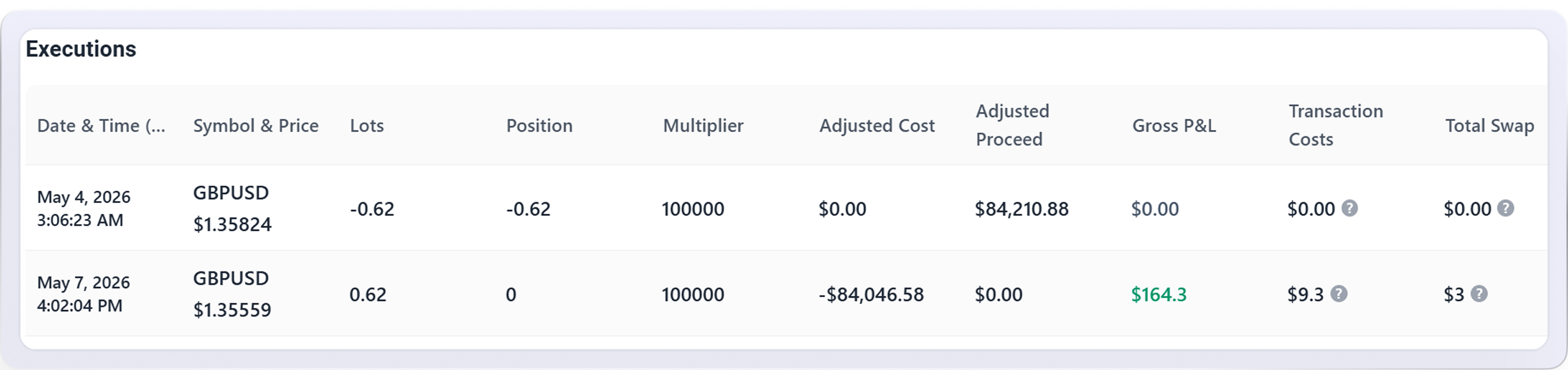
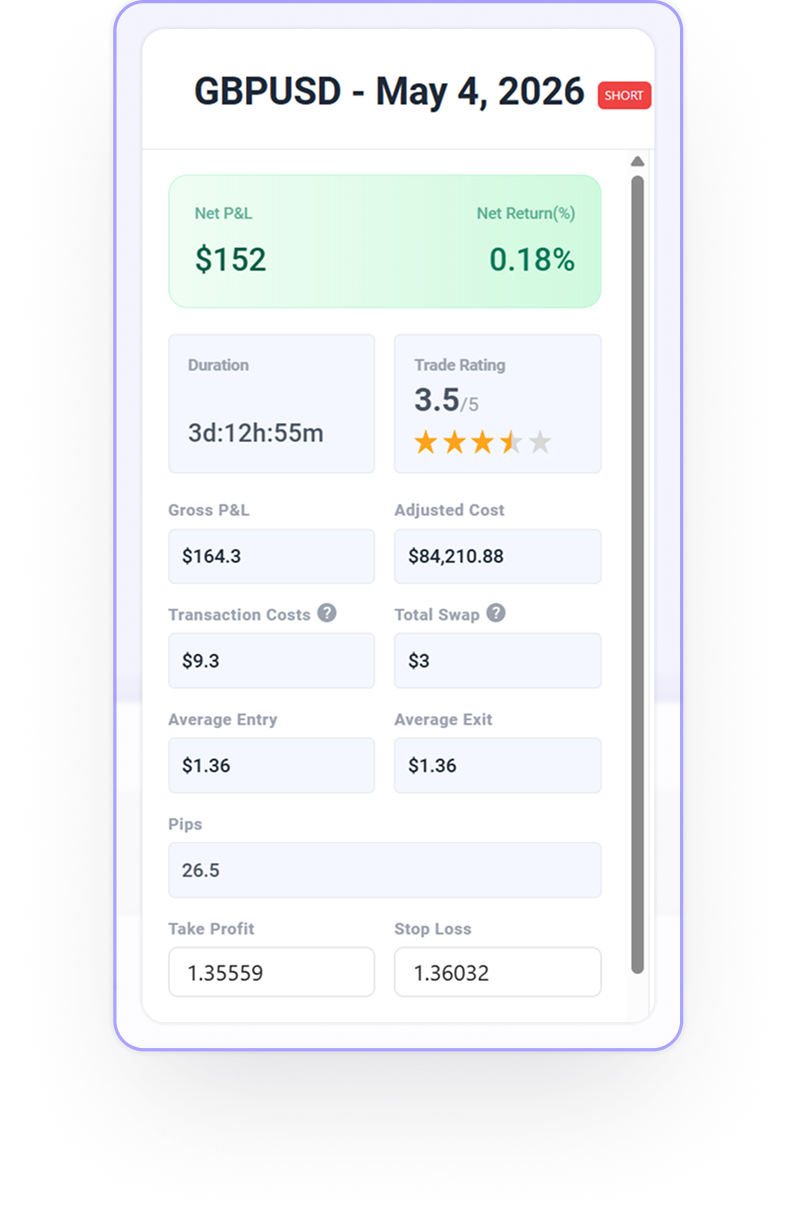
Stop and target included — the levels set on the trade, no retyping
Swap, separately — not folded into P&L, so you can see what holding cost you
Every partial close kept — closed in three pieces? Three lines, one trade
Deposits stay out of P&L — topping up a challenge account never looks like a winning week
Pips on currency pairs — in each trade's detail, beside the net result
Your broker's clock isn't your clock
MT5 shows every trade in server time — usually GMT+2 or GMT+3, wherever your broker's servers sit. Set your own time zone once in TradeBB and every report is shown in it
If you've ever wondered why your "best hour" in a report was 3 a.m., this is why

Results by hour
In the hours you actually sat at the screen
Session breakdown
Asia, London, New York, without doing the arithmetic yourself
One setting
Preference → Time Zone, then forget it
Which pair, which session, which habit
Once your trades are in, the trading journal does what MT5's History tab can't: it tells you where the result came from
By pair and by session
Where the money comes from, and where it goes
Planned vs actual risk-reward
From the stops and targets already there
Mistakes that repeat
Tag revenge trades or moved stops, see what each cost
Consistency, trade by trade
Rate how you took each trade, one to five stars
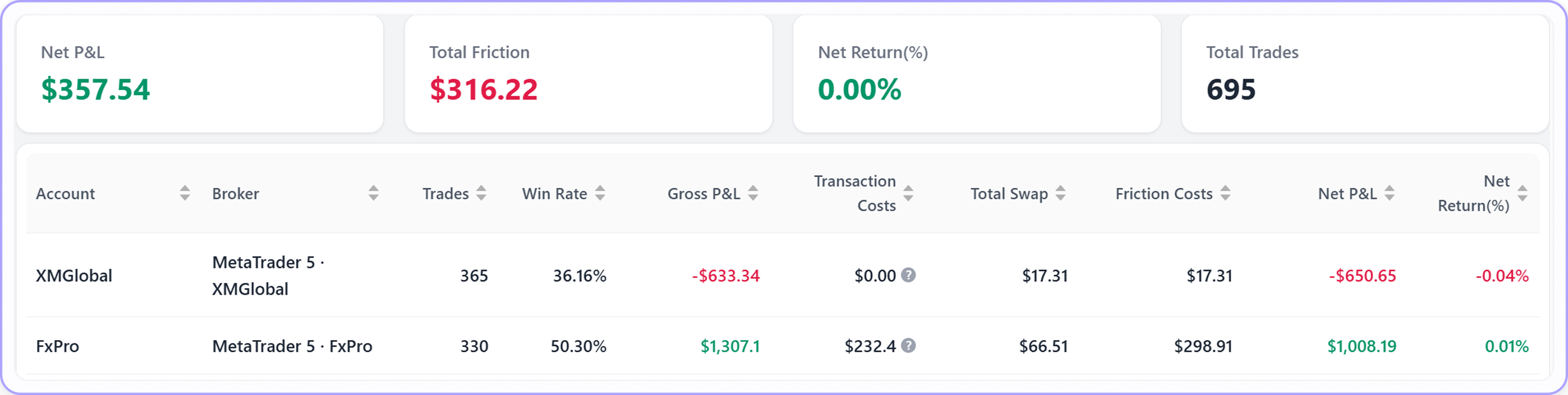
Several MT5 accounts, added up
Challenge, funded and personal in one view, or one at a time
Not what happened once. What keeps happening
For pairs, gold and sessions in depth, see the forex trading journal. Also on MT4? Add it as a separate account — the MT4 trading journal page has the steps
FAQ
Questions about connecting MT5, syncing your trades, or uploading reports? Find your answers here
Yes. TradeBB reads your trade history and cannot open, modify or close a position. Use your investor password and that's guaranteed by MT5 itself, not just by us.
No EA, no script, no plugin — and MT5 can stay closed. The connection is made to your broker's MT5 server, not to your desktop.
Search for its MT5 server name instead — the name shown at the bottom of your terminal. That's how the connection works, and it's why most MT5 brokers are covered even if you've never seen their name on an integrations list.
On the schedule you set, and any time you sync by hand — each sync pulls in every trade since the last one. The Last Update time on the account shows when that was. It isn't a live feed, and you never export or upload anything.
You choose the date range before the first sync, up to the last 12 months.
No. Add each MT5 account separately — they can be on different servers — and review them together or one at a time. Deposits and withdrawals stay out of P&L on each.
Yes. In MT5, Toolbox → History → right-click → Report → HTML, save it, and upload it to TradeBB. You get the same journal and reports; you just repeat the export each time. Works the same on Mac and Windows — TradeBB runs in the browser.
No. The Journal tab in MT5's Toolbox is the terminal's log — connections, logins, order messages. A trading journal is your closed trades with P&L, swap, commission and your own notes on each one. To get your trades out of MT5, use the History tab (right-click → Report), not Journal.
There's nothing to install. TradeBB runs in your browser — on a desktop, or in your phone's browser — so your MT5 journal is wherever you are, with the trades already in it.
Yes — the ReportTester HTML file from MT5's Strategy Tester uploads the same way, and you see that run with the same reports. Put it in a separate account in TradeBB so backtests never mix with your live trades. TradeBB reads the backtest; it doesn't run one.
Myfxbook is built to show how an account is performing and to share a verified track record publicly. TradeBB is built for reviewing your own trades: a note, tags and a rating on each one, results by setup, hour and pair, and stock and futures accounts alongside MT5. If you need a public, verified track record, that's Myfxbook's job — TradeBB doesn't publish one.
Connect MT5 once
Never export a statement again
The next time you sit down to review, the trades are already there — with swap, commission and the hour you actually took them. Your time goes on finding what to fix, not on exporting