

If you import trades into TradeBB using broker trade files, all uploaded files can be viewed and managed inside the Trade Files page.
Trade Files helps you review:
- Uploaded broker files
- Import status
- Imported row counts
- File sizes
- Upload history
You can also permanently delete uploaded trade files at any time.
Where to View Uploaded Trade Files
Go to:
Settings → Trade Files
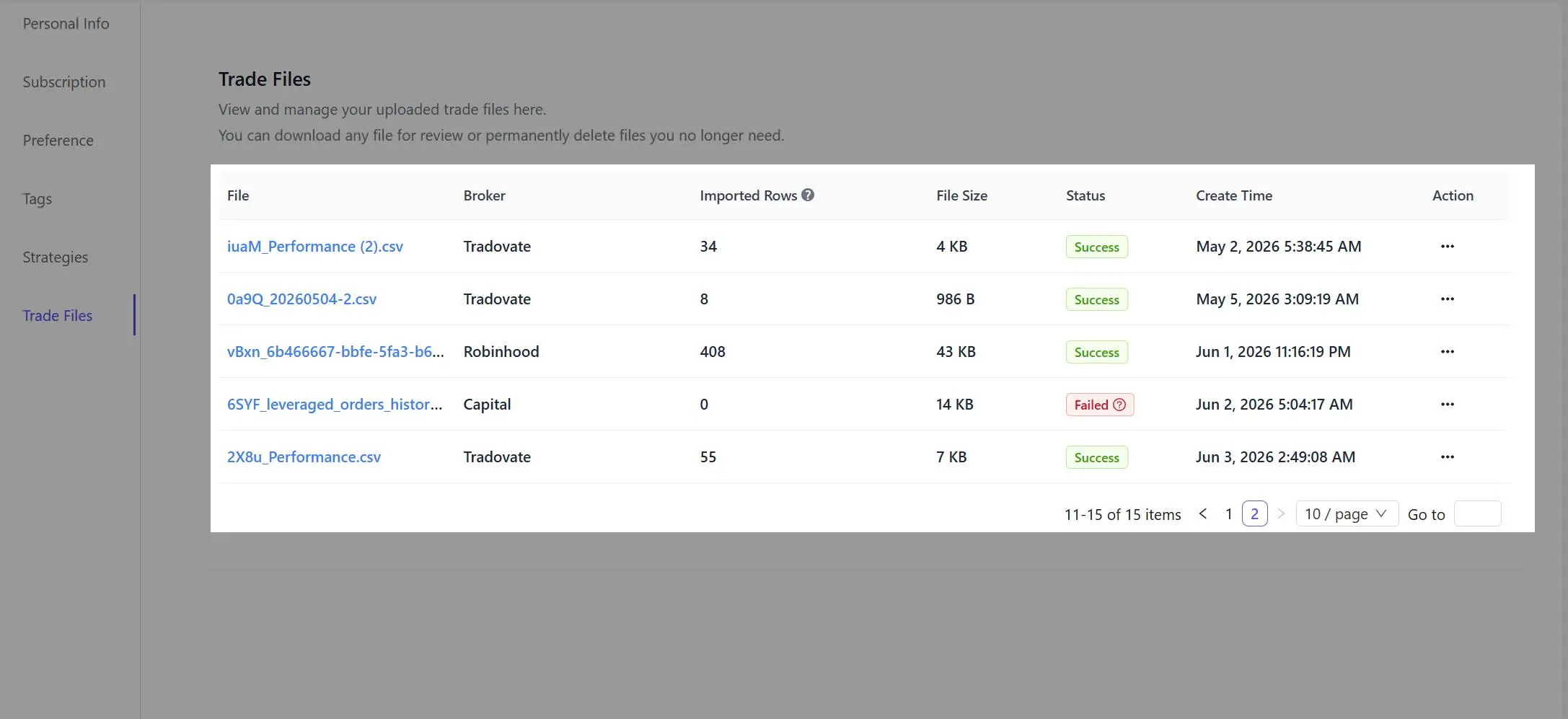
The Trade Files page displays information for every uploaded trade file, including:
- File name
- Broker
- Imported rows
- File size
- Import status
- Upload time
Understanding Import Status
TradeBB automatically processes uploaded broker files after import.
Possible statuses include:
Success
The file was successfully parsed and trade data was imported into your account.
The Imported Rows column shows how many trade records were successfully processed.
Failed
A failed status usually means the uploaded file format could not be parsed correctly.
This may happen when:
- Broker export formats change
- Required columns are missing
- Unsupported file types are uploaded
- File contents are incomplete or corrupted
Broker platforms occasionally update their export formats, which can temporarily cause import failures.
What Happens If an Upload Fails?
If a trade file upload fails, there is usually no action required from your side immediately.
Our support team actively monitors failed imports and may contact you directly to explain:
- Why the upload failed
- Whether the broker export format changed
- What file format should be used instead
In many cases, failed imports are caused by broker-side export changes rather than user mistakes.
Deleting Uploaded Trade Files
You can permanently delete uploaded trade files at any time from the Trade Files page.
Deleting a trade file only removes the uploaded file itself.
Depending on your import settings and account state, previously imported trade data may remain inside your trading journal unless separately removed.
Important Notes
- Uploaded files are stored securely
- File uploads are used only for journaling and analytics purposes
- Different brokers may use different export formats
- Import status updates automatically after processing completes