

The Automated TradeZero Trading Journal: Optimize Your Short Selling Edge
Audit your execution. Master the short side.
You use TradeZero for its locates and direct market access, essential for hitting gappers and momentum stocks. But ZeroPro is built for speed, not for hindsight. Once the market closes, relying on a flat list of executions or a "Realized P&L" column doesn't tell you why you are profitable.
TradeBB acts as your dedicated tradezero trading journal, taking your raw CSV exports and transforming them into a structured performance audit. We handle the data cleaning so you can focus on refining your entries and managing risk.
ZeroPro is for Execution, Not Analysis
Speed is everything during the opening drive, but blind repetition kills longevity.
While TradeZero provides excellent execution tools, its reporting features are designed for account balances, not behavioral improvement. A broker statement won't tell you if your "Gap Fade" strategy is losing money on Fridays. It won't flag when you are overtrading to recover locate fees. To scale, you need to move your data out of the execution terminal and into a dedicated analytics environment.
Import TradeZero CSVs in Seconds
Stop manually formatting spreadsheets. TradeBB simplifies the process of bringing your TradeZero history into a professional dashboard using our Any Broker (AI) technology.
1. File Upload (No Template Needed)
Simply export your trade history from the TradeZero web portal or platform as a CSV or Excel file. Upload it directly to TradeBB. Our system is trained to map TradeZero’s specific columns—like Symbol, Price, Side, and Time—automatically.
2. Visualize Your Performance
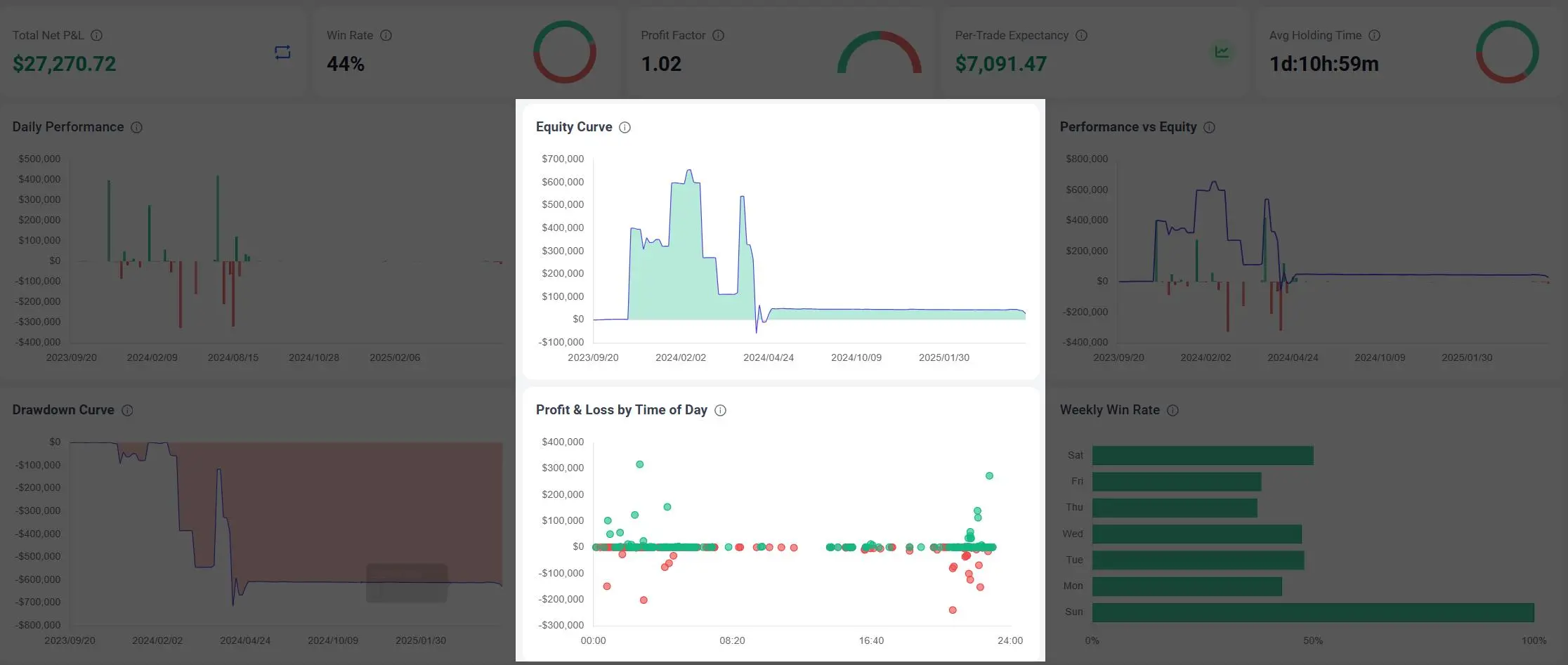
Once imported, your data populates the Dashboard.
- Equity Curve: Visualize the trajectory of your account balance to spot drawdowns early.
- Golden Hours: Use the Profit & Loss by Time of Day chart to see if you are giving back your morning profits during the afternoon chop.
The Data Integrity: Smart Recognition for Short Sellers
TradeZero users often trade on the short side, which breaks many generic trading logs. Excel templates often confuse a "Sell" (opening a short) with a "Sell" (closing a long), messing up your win rate and P&L.
TradeBB is built with Intelligent Short Recognition.
Accurate Short/Cover Sequences
We analyze your execution timestamps to automatically classify Sell-to-Open and Buy-to-Cover sequences.
- No Manual Signs: We correctly calculate profits when you sell high and buy back low, without you having to manually flip negative signs in a spreadsheet.
- Net P&L: Our engine parses commission and fee columns from your import to show your actual "Net P&L," helping you see if commission costs or locate fees are eating your edge.
The Verdict: TradeBB vs. Excel vs. ZeroPro
Why switch to a specialized tradezero trading journal?
| Feature | TradeZero Reports | Excel Spreadsheet | TradeBB Journal |
|---|---|---|---|
| Data Handling | Static List | Manual Entry | Automated CSV Import |
| Short Logic | P&L only | Often breaks on "Sell" | Auto-Detect Short/Cover |
| Fee Tracking | Line items | Hard to sum per trade | Gross vs. Net P&L |
| Pattern Day Trader | Account Status | Manual Count | Auto-Track Day Trades |
| Goal | Accounting | Record Keeping | Strategy Optimization |
Stop guessing. Import your TradeZero history now and start auditing your short selling performance today.
TradeZero FAQ
How do I export my data from TradeZero?
Log in to the TradeZero web portal. Navigate to the History or Trades tab. Select your date range and click the Excel or CSV icon to download your file. You can then upload this file directly to TradeBB using the AI Import feature.
Does this journal handle short selling correctly?
Yes. TradeBB uses intelligent order matching to recognize when a "Sell" is opening a short position and when a "Buy" is covering it. You do not need to manually adjust your data; the system calculates the P&L for short trades automatically.
Can I track my Pattern Day Trader (PDT) count?
Yes. For users on TradeZero US (or managing risk on International), TradeBB identifies trades opened and closed on the same day. This helps you monitor your day trade frequency to stay aware of your PDT status.
Does it calculate Net P&L after fees?
Yes. If your TradeZero export includes columns for commissions or fees, TradeBB parses these to display your Net P&L. This is critical for high-volume traders to understand the impact of costs on their bottom line.
Related Brokers

Broker not listed? Use Any Broker (AI) to upload your trade history file.


