 TradeBB
What's behind your Dhan P&L? Find it in your trades.
Dhan already shows you what you made. TradeBB shows you why: which trades broke your rules, which habits keep costing you, and which setups are worth repeating.
How to export
Which Dhan file to upload
TradeBB reads two Dhan files: one whose name starts with TRADE_HISTORY_CSV_, and one that starts with Dhan_GlobalTransction_Report_. Upload either as it downloads; don't rename it.
Download one of these from your Dhan account on the website, then in TradeBB open Import Trades → Upload file and drop it in.
- Use the website — on the Dhan app, reports are emailed rather than downloaded
- Not the P&L report — it totals results by stock, without each trade's times, so it can't show you a trade-by-trade review 🔶
Dhan journal vs tradebb
Dhan's Journal keeps the books. TradeBB is for the review.
Dhan's own Journal tracks your realised P&L, holdings, charges and tax reports. That's the record you need for your accounts. It isn't built to tell you which of your habits are costing you.
In TradeBB, you add that layer to every trade:
- A tag for what you did — overtrading, revenge trade, didn't take the stop
- A 1 to 5 score for how you took it — whether it won or lost
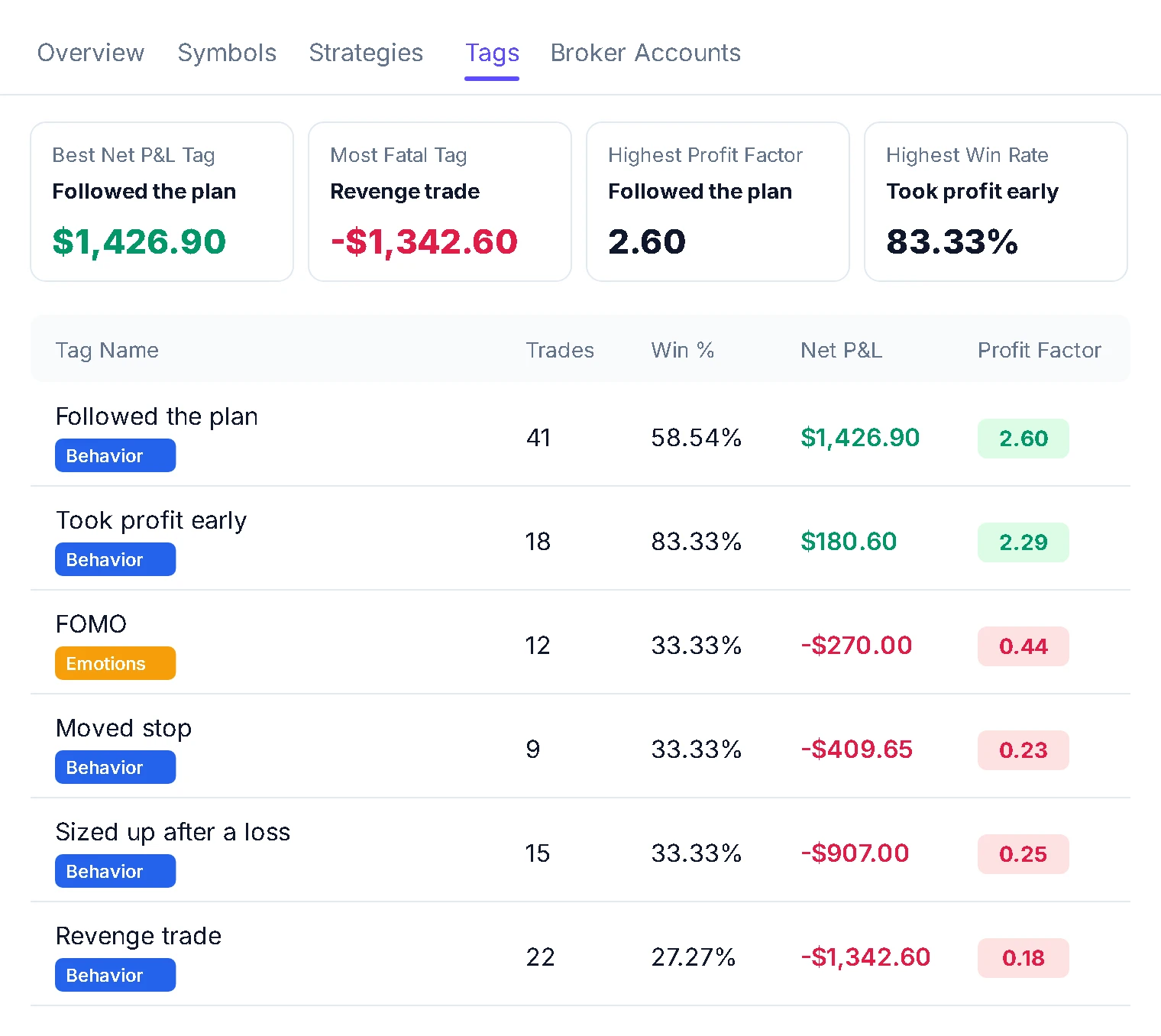
- A total per habit — the Tags report shows what each one cost you, and how often it happens
Keep using Dhan for your books. Use TradeBB to find what to fix.
After it's in
What changes once your trades are in
- Every day on a calendar — so a bad week has a shape, not just a total
- Win rate and average win against average loss — whether your winners pay for your losers
- By hour — set IST once, and see which part of the session your losses gather in
- Partial fills, your way — 🔶 work out cost oldest first, the way Dhan does, or from your average price
FAQ
Frequently asked questions
Is TradeBB the same as Journal by Dhan?
No. Journal by Dhan is Dhan's own record of your P&L, holdings and tax reports. TradeBB is a separate trading journal where you tag, score and review each trade.
Can I download my trades from the Dhan app?
On the app, reports are sent by email. Use web.dhan.co to download the file directly.
Why does TradeBB say my file isn't supported?
TradeBB reads Dhan files whose names start with TRADE_HISTORY_CSV_ or Dhan_GlobalTransction_Report_. Upload the file as it was downloaded, without renaming it.
Does TradeBB log in to my Dhan account?
No. You upload a file you downloaded yourself, so nothing stays linked to your Dhan account.
You know what you made on Dhan. Find out why.
Upload your Dhan trades and see which habits to keep and which to drop.